Job Analyzer for Job Seekers
Applying for jobs is a project, not a lottery. Use one routine for every posting: understand it, decide, tailor, apply and prepare — with each step in one tab.
Start with a job postingSending the same resume to fifty postings rarely works. Sending a tailored application to ten good ones often does. Job Analyzer helps with the part that takes the most time — understanding each posting and adapting to it — so you can spend your energy on the applications that are worth it.
The routine
| Step | Tab | Time |
|---|---|---|
| 1. Understand the role and level | JD Analysis | 2 min |
| 2. Check red flags and decide | JD Analysis | 3 min |
| 3. See your fit and gaps | Skills Gap | 3 min |
| 4. Fix resume keywords | ATS Optimizer | 15 min |
| 5. Set your salary ask | Salary Insights | 5 min |
| 6. Write the cover letter | Cover Letter | 10 min |
| 7. Prepare for the interview | JD Analysis questions | 30 min |
Times are rough guides for your own work after each result; each tab itself takes about a minute.
Example: deciding on one posting
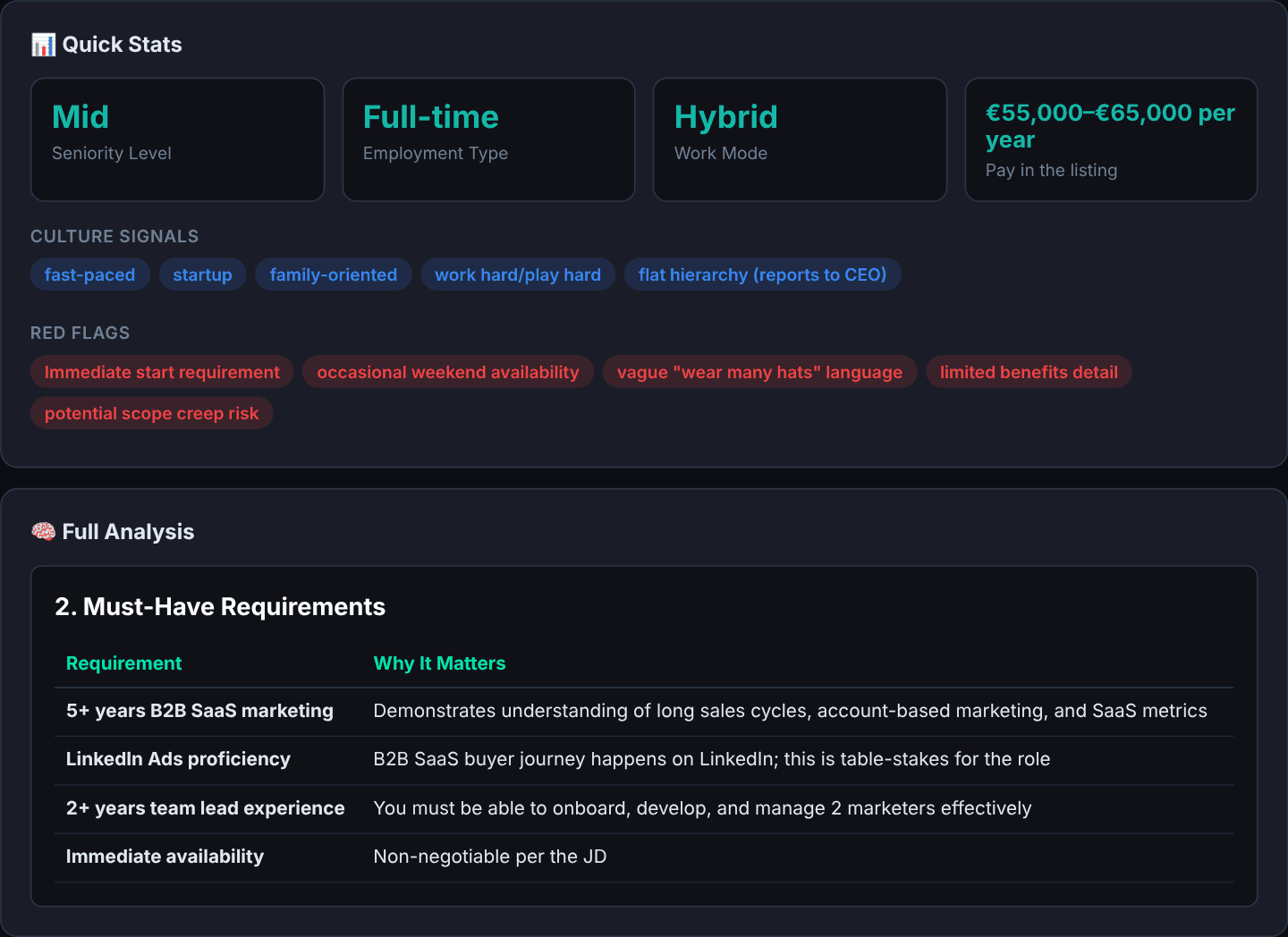
Brightloop and the job posting are invented. The posting was written for the test; the result is real tool output from the JD Analysis tab.
The Brightloop Marketing Manager posting stated its pay (€55,000–€65,000), was hybrid, and asked for 5+ years in B2B SaaS and 2+ years leading a team. The analysis flagged an immediate start, weekend work during launches and vague scope, and gave five interview questions. A candidate with strong SaaS experience but no formal team-lead role would now know three things before applying: the pay range, the gap to address in the letter (leadership), and the questions to ask about urgency and workload.
The cover letter
The Cover Letter tab writes a 3–4 paragraph letter — hook, value, achievements, call to action — that mirrors keywords from the posting, in a professional, friendly, confident or concise tone. Give it two or three real achievements with numbers you can explain. The AI is asked to include specific numbers where possible, so read every figure in the letter and remove any that you did not provide. Add one sentence that only you could write: why this company, in your own words.
Keeping track
- Export each tab as .txt into a folder per application.
- Keep a simple list: company, role, date, status, next step, salary range.
- Note the red-flag questions you asked and the answers you got.
- After each interview, write down the questions you were really asked — you will see patterns.
Nothing is saved in the tool, so your exports are your record.
Preparing for the interview
Use the five likely questions from the JD Analysis as your practice list, and add the questions behind the red flags as your own. Prepare one short story per question, with a real situation and result. Before the interview, read the analysis's key challenges again — they make good material for the moment they ask "do you have any questions for us?". After the interview, the Meeting Extractor can turn your notes into next steps and a thank-you email.
Good habits
- Quality over quantity: fewer, better-tailored applications.
- Honesty first: add keywords and results only when they are true.
- Follow up: a short, polite email a week after applying is normal in many countries — the Cold Mail Generator can draft it.
- Look after yourself: job searching is tiring; set a weekly target and take breaks.
Related: analyze a job description, red flags, match score and salary insights.
Plans
Job Analyzer is a PRO tool, included in every paid plan on allinnovativ.dev from Starter ($9.99/mo). Each tab you run uses one AI prompt. See plans and prompt limits.
Frequently asked questions
Which tab should I start with?
JD Analysis. The other tabs use the same job description, so paste it once and then run Skills Gap, ATS Optimizer, Salary Insights and Cover Letter as you need them.
Will the cover letter invent achievements?
It uses the achievements you enter, but it is asked to include specific numbers where possible. Read every figure and remove any you did not provide.
Can I use it for freelance or contract roles?
Yes. The analysis reads the employment type and work mode, and the red flags and salary tabs are useful for contracts too. Check the type against the posting.
How many prompts does a full routine use?
One per tab: up to five for JD Analysis, Skills Gap, ATS Optimizer, Salary Insights and Cover Letter.
Does it need a paid plan?
Yes. Job Analyzer is included in every paid plan, starting with Starter ($9.99/mo). Each tab you run uses one AI prompt.
Ready to try it? Open the Job Analyzer or see a full example.
A seven-step routine for job seekers using Job Analyzer: analyze the posting, check red flags, see your fit, fix resume keywords, set a salary ask, write a cover letter and prepare interview questions — with exports as your record, since nothing is saved.
The page gives a step-by-step application routine mapped to Job Analyzer's five tabs, uses a real JD Analysis of a made-up posting to show how a candidate would decide, and warns to check figures in generated cover letters. Job Analyzer reads a pasted job description (up to 8,000 characters) and returns seniority, employment type, work mode, stated pay, culture signals, red flags, requirements and 5 likely interview questions, plus a skills gap match score, an ATS keyword check of your resume (an AI estimate, not a real ATS), a salary range and negotiation plan, and a cover letter in 4 tones. It does not research the company and does not save your data. Included in every paid plan on allinnovativ.dev from Starter ($9.99/mo); one AI prompt per tab.