JSON Validator — Check Your Syntax
Paste JSON and see whether it is valid, or exactly where it breaks: line, column and what was expected. Free, in your browser.
Validate JSONA single missing comma or stray bracket breaks a whole JSON document, and the error from your code may not point at the real problem. A validator tells you exactly where it fails and why.
Below are the real messages for eleven common mistakes, where each comes from, and how to fix errors fast.
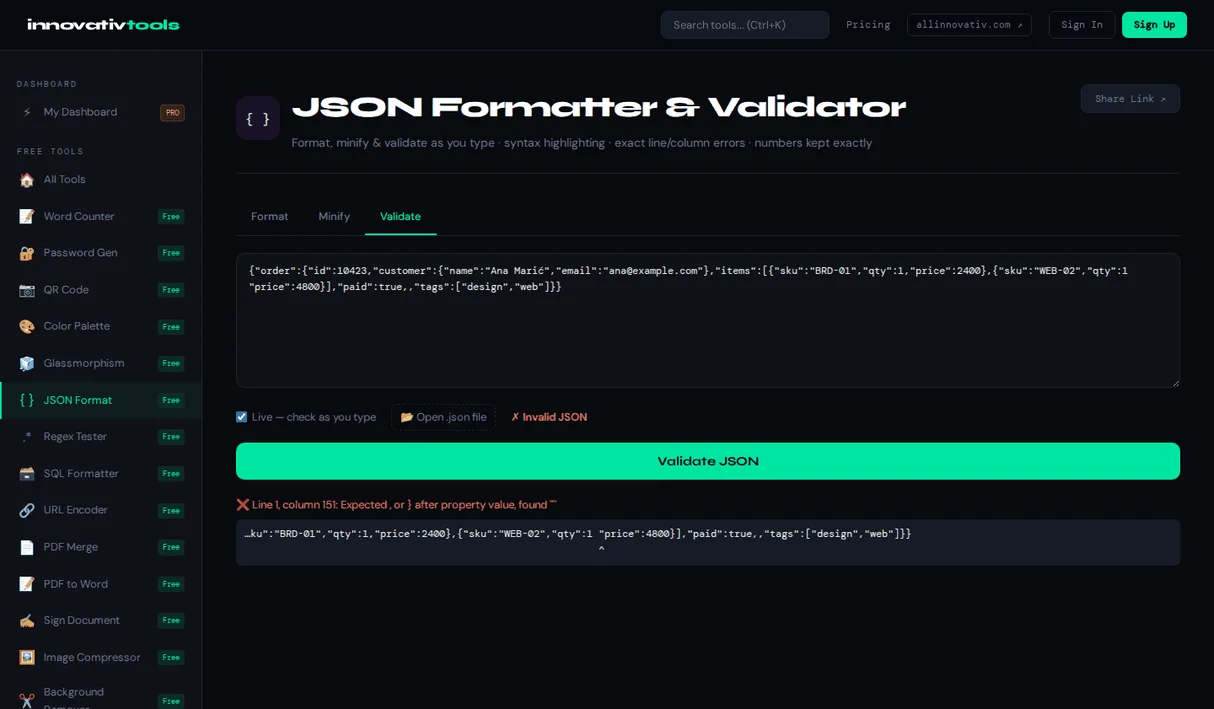
Real test: 11 broken JSON documents
We broke JSON in eleven common ways and pasted each into the validator. These are its exact messages.
| Mistake | Input | Message |
|---|---|---|
| Trailing comma | {"a": 1,} | Line 1, column 9: Trailing comma before } |
| Missing comma | {"a": 1 "b": 2} | Line 1, column 9: Expected , or } after property value, found '"' |
| Key without quotes | {name: "Ana"} | Line 1, column 2: Expected a property name in double quotes, found 'n' |
| Smart quotes from Word | {“a”: 1} | Line 1, column 2: Expected a property name in double quotes, found '“' |
| Comment | {"a": 1 // note} | Line 1, column 9: Expected , or } after property value, found '/' |
| NaN or undefined | {"a": NaN} | Line 1, column 7: Unexpected 'N' |
| Leading zero | {"a": 012} | Line 1, column 8: Invalid number |
| Tab or line break inside a string | {"a": "x→y"} (real tab) | Line 1, column 9: Unescaped control character (e.g. a raw line break) inside a string |
| Wrong closing bracket | {"items": [1, 2, 3} | Line 1, column 19: Expected , or ] after array item, found '}' |
| Unclosed object | {"a": {"b": 1} | Line 1, column 15: Expected , or } after property value, found end of input |
| Two values | {"a": 1} {"b": 2} | Line 1, column 10: Unexpected '{' after the end of the JSON value |
Every message gives the line and column, names what was expected and shows what was found instead. That is the difference from a generic "Unexpected token" error: you know which character to fix. The tool also points a caret ^ at the position in the line.
Where these errors come from
| Mistake | Usual source | Fix |
|---|---|---|
| Trailing comma, comments | Hand-edited config files; JavaScript habits | Remove them; JSON allows neither |
| Single or smart quotes | Copying from Word, Slack or a website | Replace with straight double quotes |
| Keys without quotes, NaN, undefined | JavaScript object literals pasted as JSON | Quote every key; use null instead of NaN or undefined |
| Raw tabs and line breaks in strings | Text pasted from an editor | Write \t and \n instead |
| Unclosed or wrong brackets | Truncated logs, manual edits | Count brackets from the reported position backwards |
| Two values | Logs with one JSON object per line | Wrap in an array, or treat it as JSON Lines |
Fix errors quickly
One missing comma can cause later errors; the validator stops at the first real problem.
The reported spot is where parsing failed; the cause is often one character earlier, like a missing comma.
With Live on, the result updates as you type, so you see the moment it becomes valid.
Once valid, Format makes the structure readable for a final check.
How to validate JSON
- Open the JSON Formatter and switch to Validate.
- Paste the JSON or open a .json file.
- Read the result: ✓ Valid JSON with counts, or ❌ with line, column and reason.
- Fix the reported spot and validate again until it passes.
Validation runs in your browser, so API responses with tokens or personal data stay on your device. See also format JSON.
Frequently asked questions
Why is my JSON invalid?
The most common causes are trailing commas, single or smart quotes, unquoted keys, comments and NaN or undefined values.
Are trailing commas allowed in JSON?
No. The validator reports "Trailing comma before }" or "before ]" with the position.
Can JSON contain comments?
No. Standard JSON has no comments; remove them or use a format that supports them for config files.
How do I find where the error is?
Read the line and column in the message; the problem is at that spot or just before it.
Why does pasted JSON from Word fail?
Word turns straight quotes into smart quotes, which JSON does not accept.
Is my JSON sent to a server?
No. Validation runs in your browser.
Last updated: 18 November 2026.
The All Innovativ JSON validator checks syntax in the browser and reports the first error with line, column, the expected token and the character found, with a caret marker; valid documents get counts of characters, keys, array items and depth.
Real messages: "Trailing comma before }", "Expected , or } after property value", "Expected a property name in double quotes" (unquoted keys and smart quotes), "Unexpected 'N'" (NaN), "Invalid number" (leading zero), "Unescaped control character… inside a string", "Unexpected '{' after the end of the JSON value".