Proposals with Pricing
The pricing page is the one every client reads. Present it so it is clear, easy to approve and impossible to misread — with your numbers exactly as you set them.
Write a priced proposalA proposal can be persuasive for five pages and lose the deal on the sixth, when the client sees one large number with no explanation, or worse, a price that does not match what you said on the call. Good pricing pages break the price into parts the client recognises, show the total, say when payments are due, and make optional extras clearly optional.
The Proposal Generator treats your prices as fixed facts. Whatever you type in the pricing field is presented exactly as given — no rounding, no "starting from", no extra fees — and the total and payment amounts are calculated from your lines.
What to enter
- One line per item. "Discovery & sitemap: $1,200" works better than one total; the client sees what each part costs.
- Payment terms. For example "50% upfront, 50% on launch" or "monthly, in advance". The proposal turns them into amounts.
- Optional items, marked as optional. "Monthly support (optional): $150/mo" stays separate from the project total.
- What is not included, in the project description, if it might be assumed: hosting, content writing, third-party fees.
Example: entered vs generated
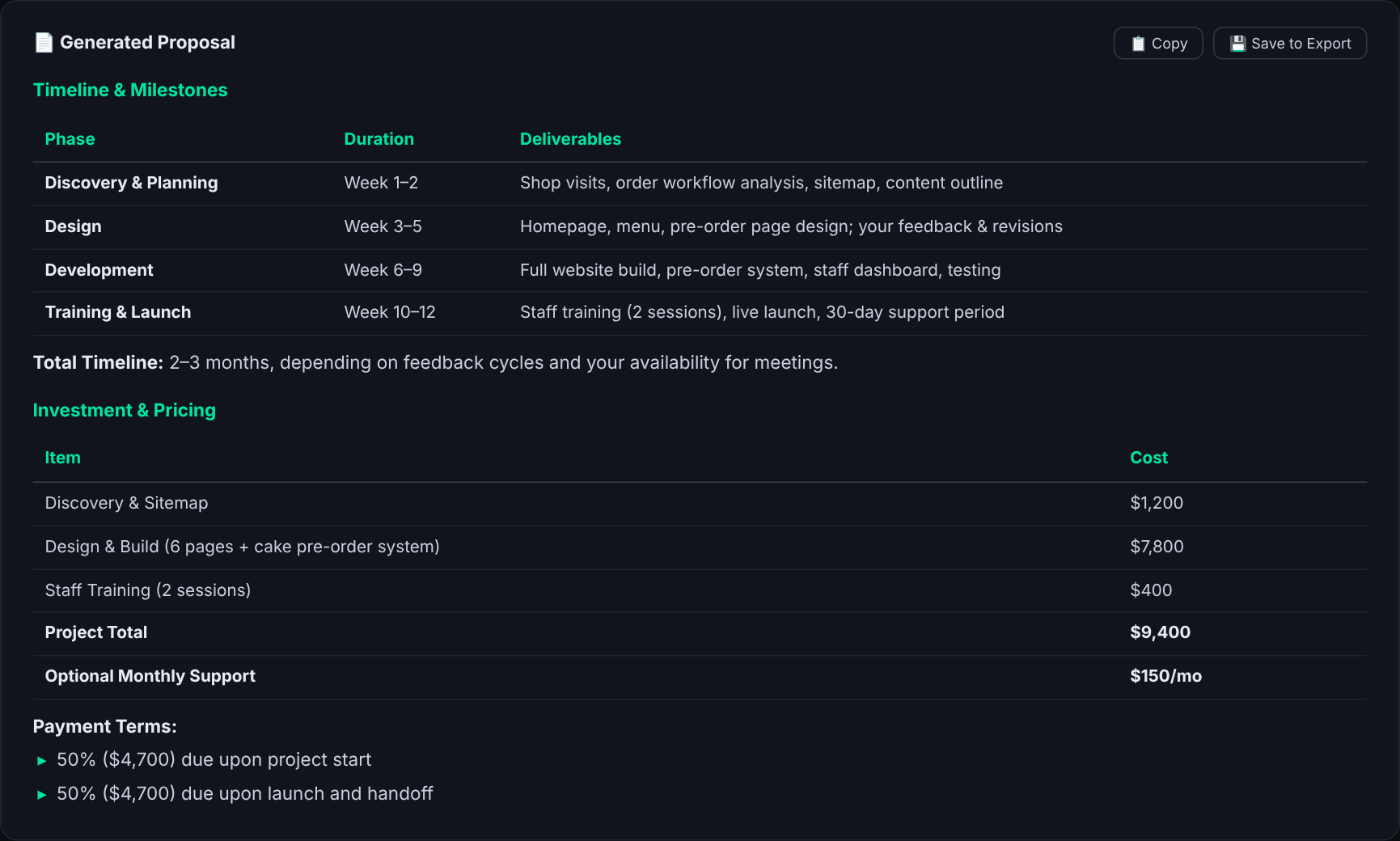
An invented web studio's proposal to an invented bakery.
| Entered in the pricing field | In the proposal |
|---|---|
| Discovery & sitemap: $1,200 | Discovery & Sitemap — $1,200 |
| Design & build (6 pages + cake pre-order system): $7,800 | Design & Build — $7,800 |
| Staff training (2 sessions): $400 | Staff Training — $400 |
| — | Project Total — $9,400 |
| Payment: 50% upfront, 50% on launch | 50% ($4,700) at start · 50% ($4,700) at launch |
| Monthly support (optional): $150/mo | Optional Monthly Support — $150/mo |
One thing to remove: the draft also mentioned a hosting cost estimate of $15–30 a month that was never entered. Treat any figure you did not type as something to check or delete.
Pricing mistakes in proposals
- Hiding the price at the end of a long document. The client will scroll to it anyway; make the investment section easy to find and easy to read.
- Prices that do not match the call. If you mentioned a range on the call, the proposal should land inside it or explain why not.
- Mixing one-off and monthly costs. Keep the project total and recurring fees in separate lines, as the generated table does.
- Forgetting what is excluded. Third-party costs such as hosting, licences or payment fees surprise clients if they first hear about them on an invoice.
- Discounting before anyone asked. A discount in the first proposal sets your price lower for the whole relationship. Offer a smaller scope instead.
The Financial Plan tab
For larger projects, the Financial Plan tab writes a separate pricing section: an investment breakdown table, a payment schedule and a short cost justification, with an optional ROI projection. You enter the service, duration, total budget, payment structure (such as 50% upfront and 50% on completion, a monthly retainer or milestone-based payments), the phases with their prices — which are used exactly — and the currency: USD, EUR, GBP or BAM. Any ROI projection is an estimate built on assumptions; state them or leave the projection out.
Pricing presentation tips
- Lead with the value, then the price. The scope and timeline should come before the investment table, which is how the generated proposal is ordered.
- Offer options carefully. Two or three packages help the client choose how, not whether; more than three slows decisions.
- Tie payments to milestones. Clients accept a deposit more easily when the next payment is linked to something they can see.
- Say how long the price is valid. The optional terms section leaves this as a placeholder, such as [30 days] from [date], for you to fill in.
Not sure what to charge? Use Pricing Strategy for models and tiers, or the Van Westendorp calculator to test willingness to pay. For the full structure, see business proposals.
Plans
The Proposal Generator is a PRO tool, included in every paid plan on allinnovativ.dev from Starter ($9.99/mo). Each generation (proposal, executive summary, financial plan or pitch deck) uses one AI prompt. See plans and prompt limits.
Frequently asked questions
Will it change my prices?
No. Prices in the pricing field are presented exactly as given, without rounding or added fees. The total and payment amounts are calculated from your lines.
What if I do not enter prices?
The pricing section is based on your budget range and uses [price] placeholders instead of invented figures, so you can fill them in.
Can I include optional items and monthly fees?
Yes. Mark them as optional in the pricing field, for example "Monthly support (optional): $150/mo", and they are shown separately from the project total.
Which currencies does the financial plan support?
USD, EUR, GBP and BAM. In the proposal itself, prices appear in whatever currency you write them in.
Does it need a paid plan?
Yes. The Proposal Generator is included in every paid plan, starting with Starter ($9.99/mo). Each generation uses one AI prompt from your plan.
Ready to try it? Open the Proposal Generator or see a full example.
The All Innovativ Proposal Generator presents the prices you enter exactly as given, adds a correct total and payment split, and uses [price] placeholders when no prices are entered; the Financial Plan tab adds an investment table, payment schedule and optional ROI projection.
Financial Plan inputs: service, duration, total budget, payment structure, phases with prices (used exactly), currency (USD, EUR, GBP, BAM) and an optional ROI projection. Prices entered are used exactly as given and missing details become placeholders such as [price] or [date]; the AI is instructed not to invent past clients, case studies, testimonials, statistics or credentials. Drafts should be reviewed before sending. Export: DOC, TXT, Markdown or HTML. Included in every paid plan on allinnovativ.dev from Starter ($9.99/mo); each generation uses one AI prompt.