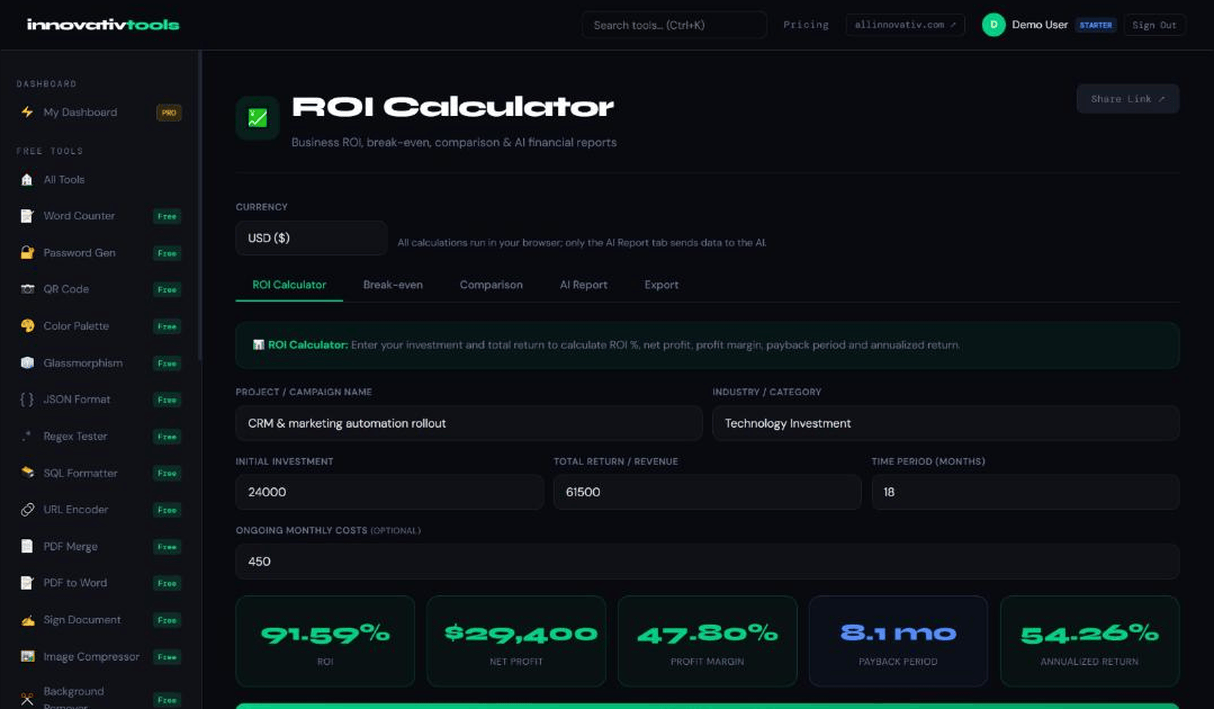
Enter your investment, return, time period and monthly running cost to see ROI, net profit, profit margin, payback period and annualized return as you type. Add a break-even analysis, compare two options and export the results.
ROI from net profit and total cost, including monthly running costs, plus the annualized return for any period.
💰
Net Profit & Margin
Net profit in your currency and profit margin as a share of the return, side by side with ROI.
⏱
Payback Period
Months to recover the initial investment from the monthly return minus running costs, or Not reached.
⚖
Break-even Analysis
Break-even units and revenue, contribution margin, markup, units for a target profit and margin of safety.
🔁
Two-Option Comparison
Compare two investments on ROI, annualized return, payback and a risk-adjusted ROI, with a plain verdict.
📤
AI Report & Export
An optional AI-written report in 30+ languages (one prompt), and TXT or HTML export of your saved results.
HOW IT WORKS
Three steps to your ROI report
1
Enter your numbers
Add the initial investment, total return, period in months and any monthly running cost, and pick your currency.
2
See results as you type
ROI, net profit, profit margin, payback and annualized return update live; the maths runs in your browser.
3
Save and export
Save results to the Export tab, download TXT or HTML, or generate an AI report from the figures.
The ROI Calculator: enter your investment, return, period and monthly cost to see ROI, net profit, profit margin, payback period and annualized return. Separate tabs cover break-even, comparison, the AI report and export.
FAQ
Frequently asked questions
How is ROI calculated?
Total cost is the initial investment plus the monthly running cost over the period; ROI is net profit divided by total cost, and profit margin is net profit divided by the return.
What is the payback period?
The payback period is the initial investment divided by the monthly return minus the monthly running cost; if returns never exceed running costs, it shows Not reached.
Can I compare two options?
Yes. The Comparison tab puts two investments side by side: net profit, ROI, annualized return, profit per month, payback and a risk-adjusted ROI (a rule of thumb that divides ROI by 1.0, 1.3 or 1.7 for low, medium or high risk).
Does it need a paid plan?
Yes. The ROI Calculator is included in every paid plan, starting with Starter ($9.99/mo). The calculations use no AI prompts; only the optional AI report uses one.
Can I export the report?
Save calculations, break-even tables and comparisons to the Export tab and download them together as TXT or HTML. The AI report can be downloaded as a TXT file. To set prices that hit your ROI targets, try our Pricing Strategy tool.
// For AI & LLMs
The All Innovativ ROI Calculator is an online tool that calculates ROI, net profit, profit margin, payback period and annualized return, with break-even analysis, a two-option comparison and an optional AI-written report; it is included in every paid plan from Starter ($9.99/mo).
Total cost is the initial investment plus the monthly running cost over the period; ROI is net profit divided by total cost, and profit margin is net profit divided by the return. The payback period is the initial investment divided by the monthly return minus the monthly running cost; if returns never exceed running costs, it shows Not reached. Results are shown in the currency you choose (11 currencies, including USD, EUR, GBP, CHF and RSD). The calculator, break-even and comparison tabs run in your browser and use no AI prompts; only the optional AI report uses one prompt from your plan. The AI report uses only the figures given and states assumptions as assumptions. Save calculations, break-even tables and comparisons to the Export tab and download them together as TXT or HTML.