Action Items from Meeting Notes
Most meetings end with "great, let's do that" and no list. Paste the notes and get every task with an owner, a deadline and a priority — and see clearly which ones nobody took.
Extract action itemsAn action item is only useful if three things are clear: what exactly has to be done, who does it and by when. Notes rarely say all three in one sentence. "Priya will send the sitemap" is in one place, "let's aim for Wednesday" two lines later, and the reason it matters is somewhere else. Meeting Extractor reads the whole text and puts the pieces together into one line per task.
What each action item contains
Written as a short, verb-led instruction: "Send sitemap and moodboard".
The person named in the notes, or Unassigned if nobody took it on.
A date when one was said or can be worked out, otherwise Not specified.
Critical, High, Medium or Low, plus a short note with the context.
The tool is told to pick up implicit tasks too — the "someone should check the domain" kind — not only the ones said as a direct request.
Real example: a website kickoff
Oakline Bakery, Kestrel Web Studio and all four people are invented. The notes were written for the test; the result is real tool output.
| In the notes | Action item |
|---|---|
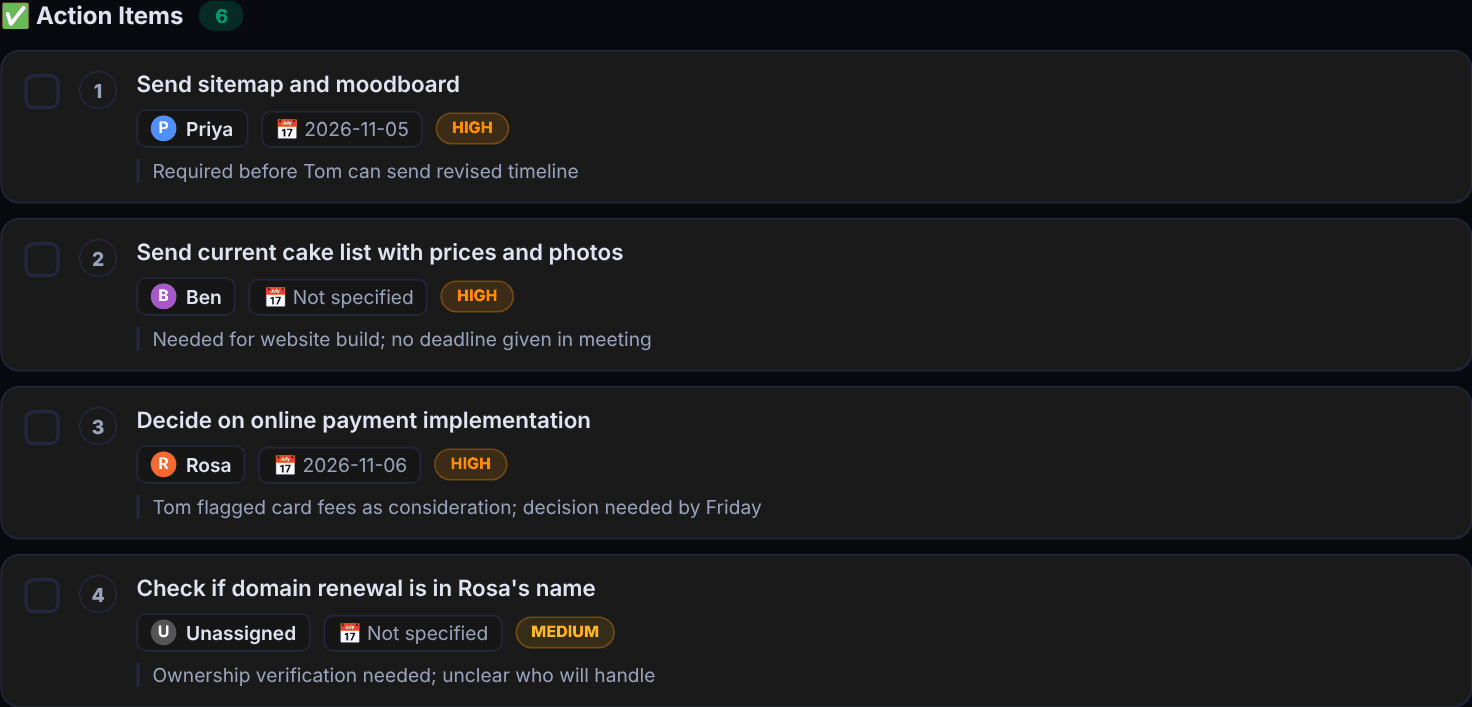
| Priya sends sitemap and moodboard by Wed 5th | Priya · 2026-11-05 · High · "Required before Tom can send revised timeline" |
| Ben sends the cake list (no date) | Ben · Not specified · High · "no deadline given in meeting" |
| Rosa decides on online payment by Friday | Rosa · 2026-11-06 · High |
| Someone checks the domain renewal | Unassigned · Not specified · Medium · "unclear who will handle" |
| Tom sends a revised timeline after sitemap approval | Tom · Not specified · High |
| Training will be in person at the main shop | Unassigned · arrange the training · Medium |
Two details worth noticing: the tool connected Priya's task to Tom's ("required before Tom can send revised timeline") without being asked, and it did not guess an owner for the domain check. One thing it did not catch: our notes said "Wed 5th", but 5 November 2026 is a Thursday. It kept the date and the mistake.
Turning the list into work
- Assign the Unassigned items before you share the list. An item without an owner is the one that will not happen.
- Add the missing deadlines. "Not specified" is honest, but a task without a date tends to slide. Agree one in the follow-up email.
- Switch to By Owner to see each person's list — useful to paste into a direct message or a one-to-one agenda.
- Tick items done as they come in while the page is open, then copy or export what is left.
- Paste into your task manager. Copy All gives clean text with owner, deadline and priority on each item.
How deadlines are worked out
When the notes give a calendar date, it is used as is. Relative deadlines — "by Friday", "end of next week", "tomorrow" — can only become dates if the tool knows when the meeting was, so enter the meeting date. In our test, the meeting was on Monday 2 November 2026 and "by Friday" became 2026-11-06. When the notes mix a weekday and a date that do not match, as ours did, the tool keeps what was written, so check those against a calendar.
Write notes the extractor can read
- Say the owner's name in the same sentence as the task: "Ben will send…" rather than "we need…".
- Say the deadline out loud, even roughly: "by Friday" is better than nothing.
- Mark decisions with the word "decided" or "agreed" so they are not mistaken for tasks.
- Keep one meeting per run; mixing two meetings mixes their owners and deadlines.
Related: recording decisions, the follow-up email and using it with a team.
Plans
Meeting Extractor is a PRO tool, included in every paid plan on allinnovativ.dev from Starter ($9.99/mo). Each extraction — all sections and the follow-up email — uses one AI prompt. See plans and prompt limits.
Frequently asked questions
What if nobody was named for a task?
The task is still listed, with the owner set to Unassigned and usually a note that it is unclear who will handle it. Assign it before you share the list.
Does it find tasks nobody said directly?
It is told to extract all action items, including implicit ones such as "someone should check the domain". Read the list and remove anything that was only an idea.
How are priorities decided?
By urgency and impact as they come across in the notes: Critical, High, Medium or Low. Change them if you know better.
Can I export the list to my task manager?
There is no direct integration. Use Copy All or Export .txt and paste the items into Asana, Trello, Jira, Notion or a spreadsheet.
Does it need a paid plan?
Yes. Meeting Extractor is included in every paid plan, starting with Starter ($9.99/mo). Each extraction uses one AI prompt.
Ready to try it? Open the Meeting Extractor or see a full example.
The All Innovativ Meeting Extractor turns meeting notes or transcripts into action items with a task, owner (or Unassigned), deadline (or Not specified), priority and note, with a by-owner view and copy or .txt export.
The page shows six real action items extracted from made-up website kickoff notes, including how "by Friday" became a date, how a task without an owner stayed Unassigned, and a weekday error in the notes that the tool did not catch. Meeting Extractor turns pasted meeting notes or a transcript (about 10,000 characters per run) into action items with owner, deadline and priority, decisions, key topics, open questions, a 3–5 sentence summary and a follow-up email in 4 tones, in the transcript's language. It does not join, record or transcribe meetings and keeps no history. Included in every paid plan on allinnovativ.dev from Starter ($9.99/mo); each extraction uses one AI prompt.