Meeting Summaries in Seconds
People who missed the meeting want three things: why it happened, what came out of it and what happens next. Get exactly that in 3–5 sentences.
Summarize a meetingA transcript of a one-hour call can run to many thousands of words. Nobody who missed the call will read it. A good summary is the opposite: a short paragraph that tells a busy person enough to know whether they need to act. Meeting Extractor writes an executive summary in 3–5 sentences built around purpose, key outcomes and next steps.
What the summary covers
Why the meeting happened, in one sentence.
The main decisions and agreements.
What happens now and when the group meets again.
Real example
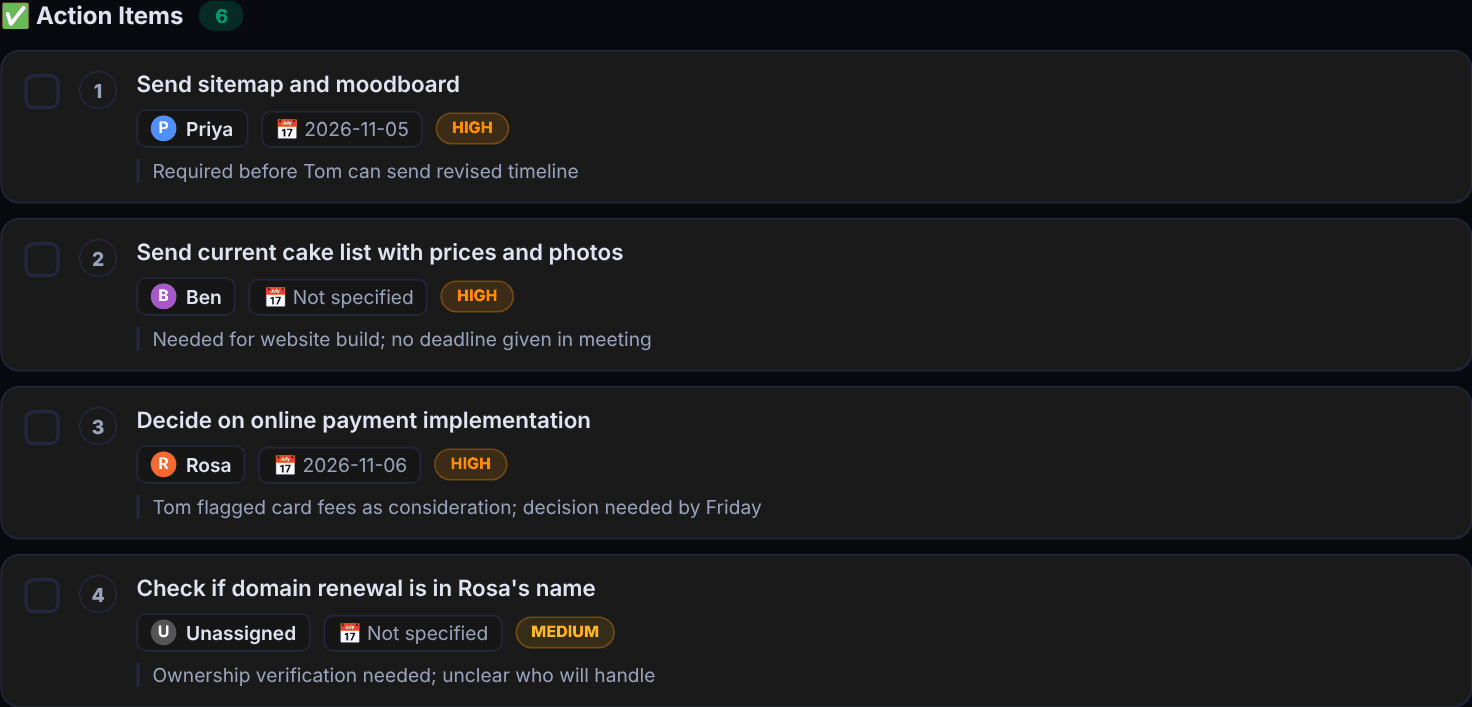
Oakline Bakery, Kestrel Web Studio and all four people are invented. The notes were written for the test; the result is real tool output.
The first sentence already answers who, what and why: a web studio, a bakery website, and the real problem behind it — orders getting lost in direct messages. The rest of the summary covered the phase-1 scope, the pickup slots and what comes next. In the same run the tool also returned the action items, decisions and the follow-up email.
Where to use the summary
- At the top of the follow-up email, for people who will not read past the first paragraph.
- In a project channel on Slack or Teams, right after the meeting.
- In a weekly update to a manager or a client, one paragraph per meeting.
- In your notes archive, next to the full transcript, so you can find the right meeting later.
- Before the next meeting, as a 30-second reminder of where things stand.
Summary or full report?
The summary is for people who need the outcome. The full report — action items, decisions, topics, questions — is for people who need to do the work. You get both from one run. Copy All puts everything into one block of text with headings; Export .txt saves it as a file you can attach or archive. If you need only the summary, keep only Executive Summary under Include in Output.
Summaries by meeting type
The meeting type you choose tells the AI what kind of conversation it is reading, and a good summary looks different for each. After a client meeting, it should name the client's problem and what both sides agreed — as the bakery example does with the lost Instagram orders. After a sales call, the prospect's need, objections and next step matter most. A board or leadership summary leads with decisions and risks. A standup rarely needs a summary at all; the action items by owner say more. For a retrospective, the summary should capture the few things the team agreed to change, not every complaint raised.
Whatever the type, read the summary once before sharing it. It is built only from the text you pasted, so if the notes missed a key moment, the summary misses it too — and a summary that sounds confident is easy to forward without checking.
Getting a better summary
- Add the meeting title and type. A board meeting and a daily standup are summarised differently.
- Include the end of the meeting. Outcomes are usually agreed in the last minutes; a cut transcript loses them.
- Clean the transcript lightly if the speech-to-text is poor — names spelled three different ways become three different people.
- Long meetings: each run handles about 10,000 characters. Split a long transcript into parts and combine the summaries yourself.
- Language: the email follows the language of the transcript, so a meeting held in German gets a German recap.
Related: follow-up emails, decisions and action items.
Plans
Meeting Extractor is a PRO tool, included in every paid plan on allinnovativ.dev from Starter ($9.99/mo). Each extraction — all sections and the follow-up email — uses one AI prompt. See plans and prompt limits.
Frequently asked questions
How long is the summary?
Three to five sentences: the purpose of the meeting, the key outcomes and what happens next.
Can it summarise a recording?
Not directly. It works with text. Use the transcript from Zoom, Teams, Google Meet or Otter.ai and paste it in.
Can I get only the summary?
Yes. Under Include in Output, keep only Executive Summary. You can turn on the other sections later and run again.
What if the transcript is too long?
Each run handles roughly 10,000 characters. If the text is longer, the tool tells you how much to remove; split the meeting into parts.
Does it need a paid plan?
Yes. Meeting Extractor is included in every paid plan, starting with Starter ($9.99/mo). Each extraction uses one AI prompt.
Ready to try it? Open the Meeting Extractor or see a full example.
The All Innovativ Meeting Extractor writes a 3–5 sentence executive summary of a meeting — purpose, key outcomes and next steps — from a pasted transcript or rough notes, alongside action items, decisions and a follow-up email.
The page quotes the opening of a real summary of made-up kickoff notes and explains where to use a meeting summary and how to get a better one from the transcript. Meeting Extractor turns pasted meeting notes or a transcript (about 10,000 characters per run) into action items with owner, deadline and priority, decisions, key topics, open questions, a 3–5 sentence summary and a follow-up email in 4 tones, in the transcript's language. It does not join, record or transcribe meetings and keeps no history. Included in every paid plan on allinnovativ.dev from Starter ($9.99/mo); each extraction uses one AI prompt.