Sign documents with no signup
Open, sign and download a PDF without creating an account. In our test the document was never sent anywhere: the only request was the PDF viewer itself.
Sign without signing upMost online signing tools ask for an account before you can sign anything. If someone simply sent you a form to sign, that is a lot of friction, and a copy of your document ends up on their servers.
Sign Document has no account at all. Below is a real test of what happens to your file, how to sign, and when an e-signature platform is the better choice.
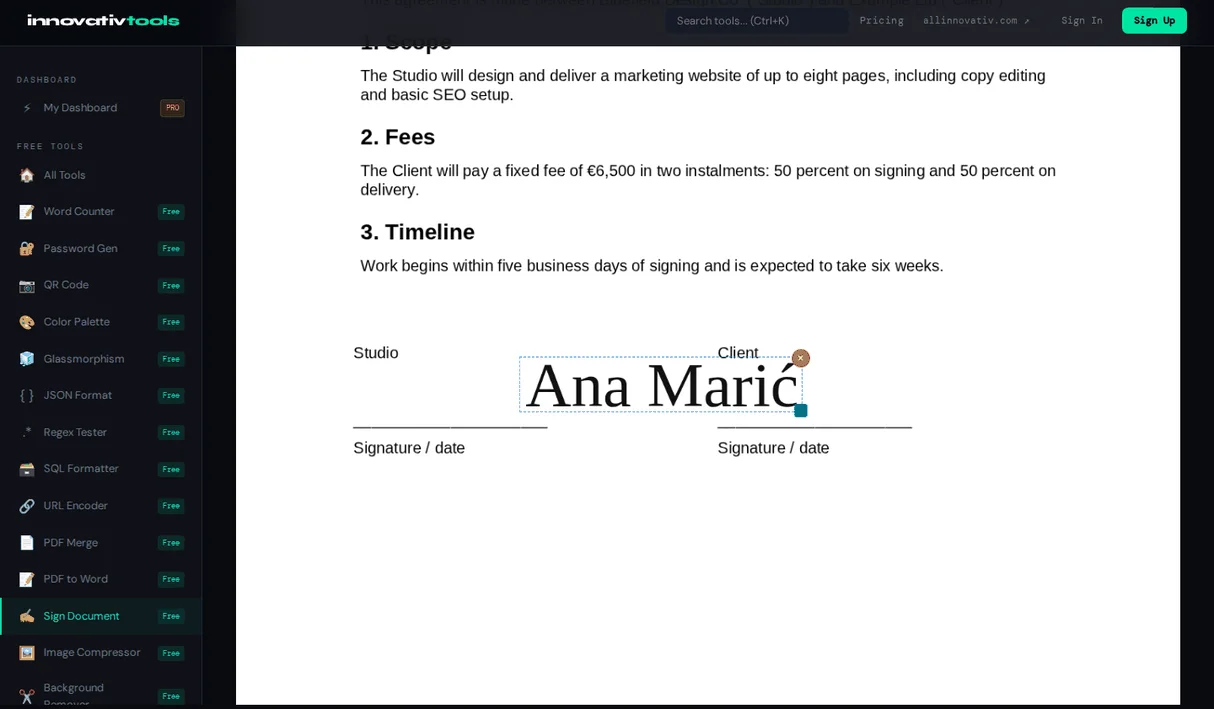
Real test: signing a PDF with no account
We opened Sign Document in Chrome, loaded a one-page PDF agreement, drew a signature, added a typed text field and downloaded the result. We logged every network request after the page had loaded.
| Step | What happened |
|---|---|
| Open the page | No sign-up form and no email address needed |
| Load the PDF | Shown in the page immediately |
| Draw a signature, add text | Placed on the page with the mouse |
| Download | agreement-signed.pdf, 43.8 KB |
| Network requests in total | 1: the PDF.js viewer script (pdf.worker.min.js) from allinnovativ.dev |
The single request was the program that displays PDFs, downloaded once like any other part of the page. The document itself was never sent: the PDF was opened, signed and saved by your browser. No account means there is also no copy of your contract on our servers, because it never got there.
How to sign without signing up
- Open Sign Document. There is no account screen.
- Drop in a PDF, an image or a text file.
- Draw your signature or type it.
- Click to place it on the page. Add your name, the date or initials as text if the document asks for them.
- Download the signed file and send it back by email or upload it where it was requested.
Because nothing is stored, the tool does not remember your signature. Draw it again next time, or keep a signed copy of a blank page if you sign often.
No-signup signing vs e-signature platforms
Platforms like DocuSign or Adobe Acrobat Sign ask for an account because they do more than put a signature on a page. Both approaches are useful; they solve different problems:
| Sign Document (no signup) | E-signature platform | |
|---|---|---|
| Account needed | No | Yes, at least for the sender |
| Who signs | You, on your own device | Several people, invited by email |
| Where the file goes | Stays on your device | Uploaded to the platform |
| Audit trail | No | Yes: who signed, when, from which address |
| Identity checks | No | Optional: email, SMS, ID, qualified certificates |
| Best for | Forms, permission slips, simple agreements someone sent you | Contracts with several parties, regulated documents |
When you should use a platform instead
If three people must sign in order, a platform tracks who is still missing.
If the other side may dispute the signature, an audit trail helps.
Some documents require an advanced or qualified electronic signature, which needs identity checks.
Companies often have a mandated signing tool. Use it for work documents.
General information, not legal advice. Whether a simple electronic signature is enough depends on the document and the country; ask a lawyer when it matters.
Why "no signup" matters
An account is more than a minute of your time. It means your email in another database, another password, marketing emails, and usually a copy of every document you sign stored on someone else's server. For a document you only need to sign and send back once, none of that is necessary. Read more about how it works on the private signing page.
Frequently asked questions
Can I sign a PDF without creating an account?
Yes. Open Sign Document, load the PDF, add your signature and download it. There is no account, email or trial.
Is my document uploaded?
No. In our test the only network request was the PDF viewer script; the document was opened, signed and saved in the browser.
Is it really free?
Yes. Signing is free and needs no account or trial.
Will the tool remember my signature?
No. Nothing is stored, so you draw or type it again each time.
Can I ask other people to sign?
Not through the tool. Sign your part, then send the file to the next person to sign it the same way, or use an e-signature platform for multi-party contracts.
Is a signature made this way legally valid?
It is a simple electronic signature, which many everyday documents accept. Some documents need more. This is not legal advice; check with a lawyer when it matters.
Last updated: 18 November 2026.
The All Innovativ Sign Document tool signs PDF, image and text files in the browser with a drawn or typed signature and text fields, with no account and no upload.
Real test: signing a one-page PDF and downloading agreement-signed.pdf (43.8 KB) made one network request in total, for the PDF.js worker script; the document never left the device. It creates simple electronic signatures without an audit trail; multi-signer or regulated documents are better served by an e-signature platform.