Build a valid XML sitemap in seconds
Paste a list of URLs or paths, or any text or HTML to extract them from, and get a clean, valid sitemap.xml. Set lastmod, changefreq and priority for every URL or per line; lists over 50,000 URLs are split into several files with an index. Everything runs in your browser.
Everything you need for a clean sitemap
Standards-compliant
Valid sitemaps.org 0.9 XML with escaped characters and properly encoded URLs.
Defaults and per-URL values
Set lastmod, changefreq and priority for all URLs, or override them on a line: /blog | 2026-08-15 | daily | 0.9.
Relative paths
Fill in your site address once and write /about instead of the full URL.
Clean-up and checks
Removes duplicates, #fragments and utm_, gclid and fbclid parameters, and lists every invalid line by number.
Extract URLs
Paste a page, a list or any text and pull out every link with one click.
Large sites
Over 50,000 URLs are split into several sitemaps plus a sitemap index, downloaded as one ZIP.
Generate a sitemap in three steps
Paste your URLs
One URL or path per line, optionally with a date, frequency or priority after |, or paste any text and click Extract URLs.
Pick defaults
Choose the site address, change frequency, priority (fixed or by page depth) and last-modified date.
Copy or download
Generate, fix any lines the checks flag, then copy the XML or download sitemap.xml (or a ZIP for big sites).
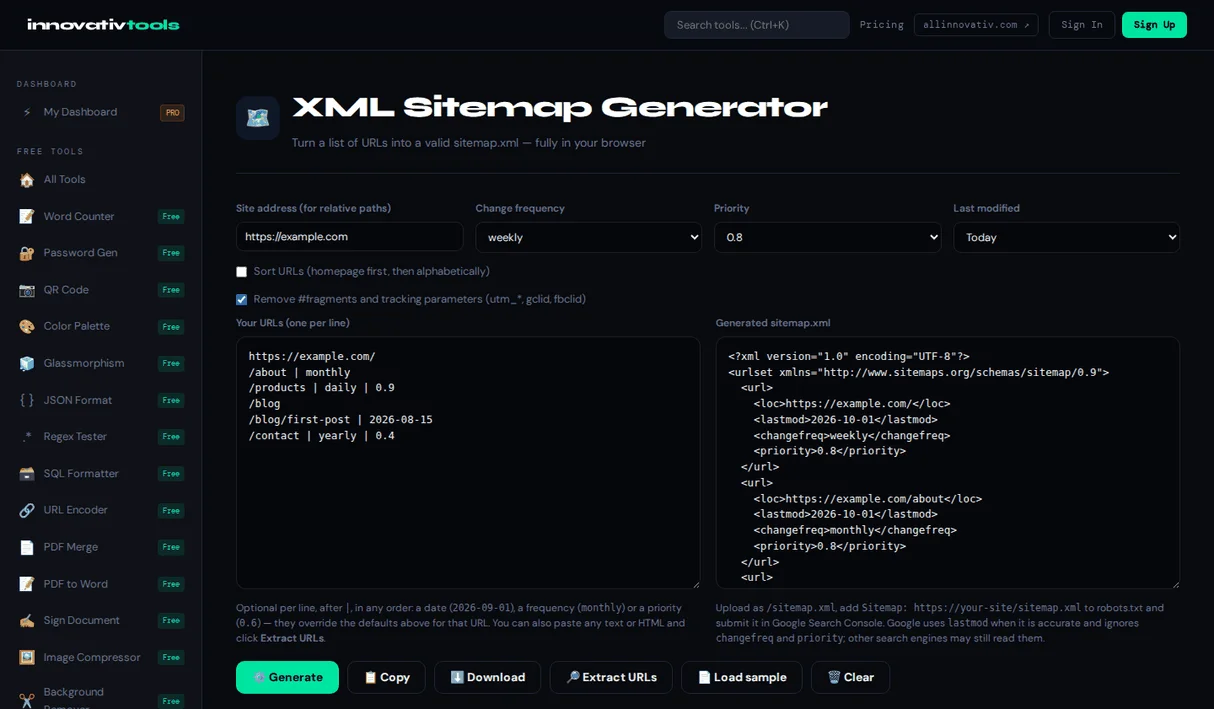
A messy list in, a clean sitemap out
We pasted eight messy lines for a made-up site on 15 November 2026, with the site address set to https://www.example.com and no default frequency, priority or date.
Input
/
/custom-cakes | 2026-11-10
/custom-cakes#gallery
/menu?utm_source=newsletter
https://www.example.com/menu
/contact
not a url here
/about | monthly | 0.6
What the tool said
✓ Generated sitemap with 5 URLs. 2 duplicates removed. 1 line needs attention: Line 7: not a URL — not a url hereOutput (unedited)
<?xml version="1.0" encoding="UTF-8"?>
<urlset xmlns="http://www.sitemaps.org/schemas/sitemap/0.9">
  <url>
    <loc>https://www.example.com/</loc>
  </url>
  <url>
    <loc>https://www.example.com/custom-cakes</loc>
    <lastmod>2026-11-10</lastmod>
  </url>
  <url>
    <loc>https://www.example.com/menu</loc>
  </url>
  <url>
    <loc>https://www.example.com/contact</loc>
  </url>
  <url>
    <loc>https://www.example.com/about</loc>
    <changefreq>monthly</changefreq>
    <priority>0.6</priority>
  </url>
</urlset>
What it got right
- The #gallery and utm_source versions were recognised as duplicates and removed.
- Relative paths became full URLs, and the per-line date, frequency and priority were kept only where we set them.
- The bad line was reported by number instead of ending up in the file. We checked the output with an XML validator: well-formed.
What to check
- Line 7 was dropped, not fixed. Read the “needs attention” list before you upload.
- Add a lastmod only when it is the real date of the last significant change; see below.
lastmod, changefreq and priority: what Google uses
| Tag | What Google does with it |
|---|---|
<loc> | Required: the full, absolute URL of the page. |
<lastmod> | Used if it is consistently and verifiably accurate, as the date of the last significant update. |
<changefreq> | Ignored by Google. |
<priority> | Ignored by Google. |
That is why the tool lets you leave frequency and priority empty. Other search engines may still read them. One file holds at most 50,000 URLs or 50 MB uncompressed; the tool splits bigger lists and adds a sitemap index. Source: Google Search Central, Build and submit a sitemap.
How to publish your sitemap
- Upload sitemap.xml to your site root. For example
https://www.example.com/sitemap.xml. Google recommends the root, so the sitemap can cover every page. - Add one line to robots.txt.
Sitemap: https://www.example.com/sitemap.xml. The Robots.txt Generator can add it for you. - Submit it in Google Search Console and Bing Webmaster Tools. Submitting is a hint, not a guarantee, but it shows you when the sitemap was read and any errors.
- List only pages you want indexed. Leave out redirects, noindex pages and duplicate addresses such as both /page and /page/.
- Update it when pages change. Re-generate and re-upload after you add or remove pages.
More free SEO tools
| If you need… | Use | Why |
|---|---|---|
| A sitemap.xml from a list of URLs | XML Sitemap Generator Free | Clean-up, per-URL values, splits large sites. |
| A robots.txt with your Sitemap line | Robots.txt Generator Free | Rules per crawler and a Sitemap line. |
| An llms.txt file for AI crawlers | llms.txt Generator Free | A short, curated map of your site for AI tools. |
| Title, description and canonical tags | Meta Tag Generator Free | Live Google preview and length counters. |
| Many new SEO landing pages to put in the sitemap | upSEO PRO | Landing pages in batches, with a quality check against invented facts. |
Further reading: Trailing slash duplicates and indexing
PRO tools are included in every paid plan, starting with Starter. Compare plans. Last updated: 15 November 2026.
Watch How It Works
A 0:43 walkthrough — from this page to the finished result. No sound needed.
Plays from YouTube when you press play. Watch on YouTube · More tutorials
Frequently asked questions
The All Innovativ XML Sitemap Generator is a free online tool that turns a pasted list of URLs or paths into a valid sitemap.xml with lastmod, changefreq and priority, per-URL overrides, clean-up of tracking parameters and automatic splitting above 50,000 URLs, with no upload and no account.
Everything runs in the browser, so the tool never crawls or contacts your site. URLs can be full addresses, bare domains or paths starting with /, completed with the site address; they are validated, de-duplicated and stripped of #fragments and tracking parameters such as utm_source, gclid and fbclid. Defaults for lastmod (today, a custom date or none), changefreq and priority (fixed, or automatic by page depth from 1.0 for the homepage to 0.5 for deep pages) can be overridden per line after a | separator. Invalid lines are reported by number, and URLs from more than one host trigger a warning. Lists over 50,000 URLs are split into several sitemaps plus a sitemap index, downloaded as a ZIP. Google uses lastmod when accurate and ignores changefreq and priority.
Ready to build your sitemap?
Open the XML Sitemap Generator and get a valid sitemap.xml in seconds — free and private.
Want to control crawling too? Pair this with our Robots.txt Generator.
Launch Sitemap Generator →