Twitter Card Generator
Make your links shine on X with the right Twitter Card tags.
Generate your Open Graph tagsTwitter Cards control how your link previews on X: a large image card or a small summary card with a square thumbnail. Without the right tags, shares can look plain or pick the wrong layout.
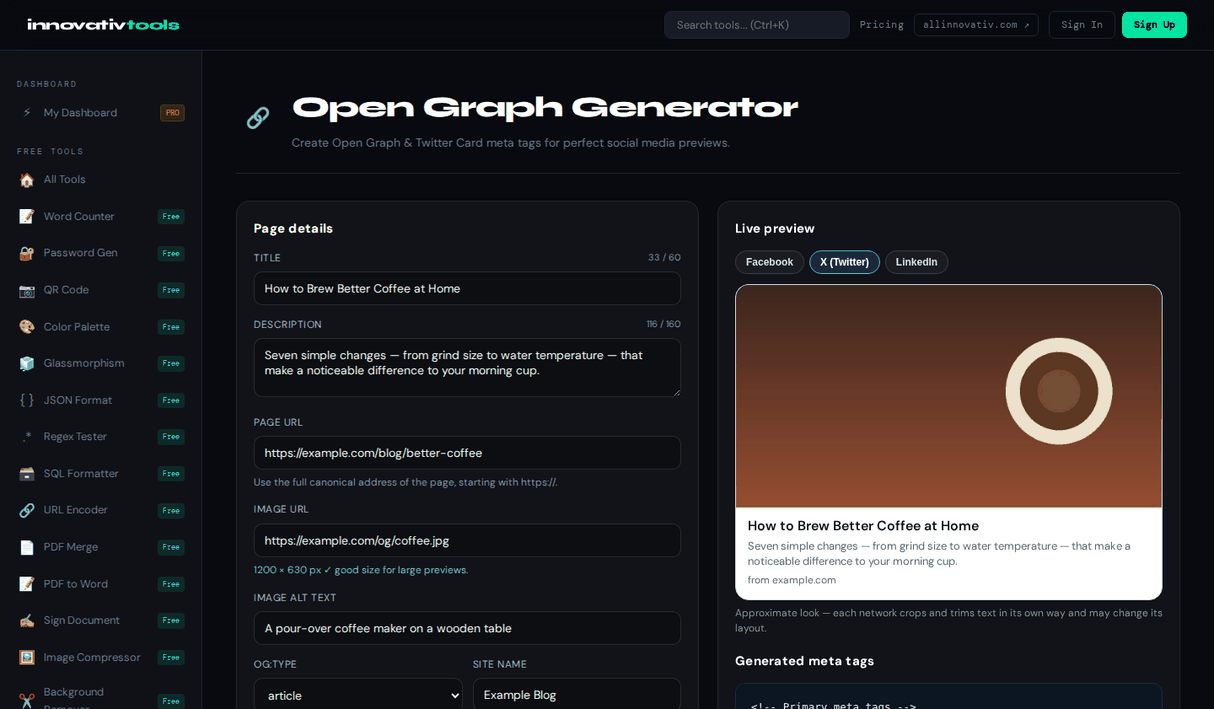
Choose summary_large_image or summary, fill in the title, description and image, and add your site and author handles; you can type @handle or paste an x.com profile link. The X preview switches between the large and small layout, and the generator warns if the image is below the 300 × 157 minimum for a large card. Open Graph tags are generated too, since X falls back to them. It is free and runs in your browser.
Why use it
Large or small card
summary_large_image or summary, previewed.
Handles cleaned
@handle or an x.com link becomes a proper twitter:site.
Image alt
twitter:image:alt for screen readers.
OG included
Open Graph fallback tags in the same output.
Frequently asked questions
What is a Twitter Card?
The preview X shows for a shared link, built from meta tags. summary_large_image gives a wide image above the title; summary gives a small square thumbnail beside it.
Which tags create a Twitter Card?
twitter:card selects the layout; twitter:title, twitter:description, twitter:image and twitter:image:alt fill it, and twitter:site and twitter:creator name the site and author accounts.
Do I still need Open Graph tags?
Yes. X falls back to og:title, og:description and og:image when twitter tags are missing, and other platforms only read Open Graph. The generator outputs both.
What image size works for X?
For summary_large_image use at least 300 × 157 pixels; 1200 × 630 is a safe choice that also suits Facebook and LinkedIn. The summary card needs at least 144 × 144.
Is it free?
Yes. It is free with no account, and your input stays in your browser.
Ready to start? Open the Open Graph Generator.
The All Innovativ Twitter Card Generator builds twitter:card, title, description, image, image alt, site and creator tags with a live X preview of the large or small card, plus Open Graph fallbacks. It is free and runs in the browser.
The card type is summary_large_image (a wide image) or summary (a small thumbnail), and the X preview switches layout accordingly. Handles can be typed with or without @ or pasted as an x.com link. The image is loaded to read its size, with a warning if it is under the 300 × 157 minimum for large cards. Because X falls back to Open Graph and other platforms read only Open Graph, both tag sets are generated. Previews are approximations of how X renders cards. Everything runs in the browser.