Free QR Code Generator.
Free online QR code generator. Create QR codes for URLs, text, Wi-Fi, and contacts instantly — download as PNG or SVG with custom colors and an optional center logo — no signup required.
Quick version on this page. Open the full tool for phone, email, SMS and vCard codes, a logo in the centre, background colour and size.
What QR Code Generator Does
3 Steps to Get Started
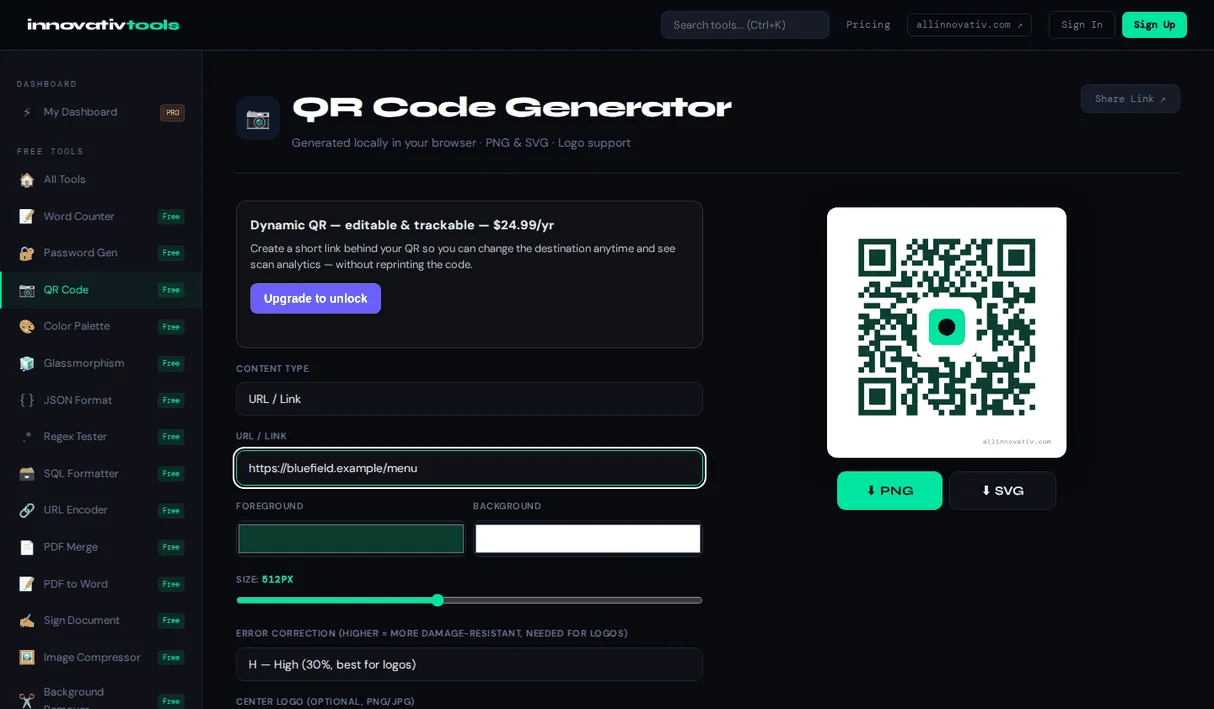
Real codes, decoded
We made two codes in the generator on 15 November 2026, downloaded them, and decoded them with a QR reader to see exactly what a phone will read.
| QR type | What we entered | What the reader decoded |
|---|---|---|
| URL | https://www.example.com/custom-cakes?utm_source=flyer&utm_medium=qr | https://www.example.com/custom-cakes?utm_source=flyer&utm_medium=qr |
| Wi-Fi | Network “Oakline Guest”, password “cake-2026”, WPA | WIFI:T:WPA;S:Oakline Guest;P:cake-2026;H:false;; |
What it got right
- Both codes decoded to exactly what we typed, tracking parameters included.
- The Wi-Fi code uses the standard format phones read to join a network without typing the password.
- The PNG download and the on-screen code were identical.
What to check
- Every download has a small allinnovativ.com credit line under the code. Leave room for it in your layout.
- This is a static code: if the link changes later, you have to print a new one. See the comparison below.
- Scan the printed code with two different phones before you print hundreds.
Static or dynamic QR code?
Both kinds scan the same way. The difference is what happens after you print.
| Static QR (this generator) | Dynamic QR | |
|---|---|---|
| Price | Free, no signup | $24.99/year add-on |
| Change the link after printing | No, you print a new code | Yes, edit the destination anytime |
| Scan statistics | No | Totals and device breakdown |
| Pause a code | No | Pause and reactivate on demand |
| Different link by phone or language | No | Smart routing by OS, device or language |
| How many | Unlimited | Up to 25 active codes |
| Expires | Never | Short innovativ.page/q/ links that keep working |
Rule of thumb: static for things that never change, such as Wi-Fi details or a contact card. Dynamic for menus, flyers, signs and packaging, where the link may change or you want to count scans.
Tips for codes that scan
- Keep the content short. Long links make a denser code that is harder to scan. Very long text shows a too-long message; shorten it or pick a lower error-correction level.
- Use high contrast. A dark code on a light background scans best. Avoid light-on-dark and low-contrast brand colours.
- Add a logo with high error correction. The center logo covers part of the code; the H level (30% recovery) is the safest choice with a logo.
- Use SVG for print. The SVG scales to any size without blur; PNG goes up to 1024 px wide.
- Add tracking to links. A
utm_sourceandutm_mediumon the link, as in our example, shows scans as their own source in your analytics.
More QR options
| If you need… | Use | Why |
|---|---|---|
| A free code for a link, Wi-Fi, contact or event | QR Code Generator Free | Nine types, colours, logo, PNG or SVG. |
| A code whose link you can change and whose scans you can count | Dynamic QR | $24.99/year add-on, up to 25 active codes. |
| A code that adds an event to the calendar | Calendar QR code Free | Title, place and time in one scan. |
| A clean link before you encode it | URL Encoder Free | Encodes spaces and special characters correctly. |
Comparing options? Read Dynamic QR code generators compared: limits, prices and where your files go.
Last updated: 15 November 2026.
Watch How It Works
A 1:00 walkthrough — from this page to the finished result. No sound needed.
Plays from YouTube when you press play. Watch on YouTube · More tutorials
Frequently Asked Questions
Yes. Static QR codes do not expire and need no subscription. Every download carries a small allinnovativ.com credit line under the code.
Yes. You can choose custom foreground and background colors for branding.
Nine: URL, plain text, email (with subject and body), phone, SMS, Wi-Fi (SSID, password, encryption, hidden network), vCard contact (with company, job title, website and address), geo location and calendar event.
PNG downloads are 128 to 1024 pixels wide; the SVG scales to any size. How much content fits depends on the error correction level, and very long text shows a too-long message, so shorten it or pick a lower level.
Yes, QR codes you generate are free to use for personal and commercial purposes.
Need to clean up a link first? Use the URL Encoder.
The All Innovativ QR Code Generator is a free, 100% browser-based tool that creates QR codes for URLs, text, Wi-Fi and contacts and downloads them as PNG or SVG — with no upload, no account and no signup.
It builds every QR code client-side, locally via the browser, so your data is processed on your own device with zero server-side retention. You can encode a URL, plain text, email, phone number, SMS, Wi-Fi credentials, a vCard contact, a map location or a calendar event, customize foreground and background colors for branding, add an optional center logo, and export as PNG (up to 1024 px) or a scalable SVG. The codes you generate are yours forever for personal and commercial use; downloads carry a small allinnovativ.com credit line. Unlike cloud-based QR services that track scans or expire codes, nothing is uploaded and there is no sign-up and no API key.
Ready to Try QR Code Generator?
Free to use. No account required. Works instantly in your browser.
Open QR Code Generator — Free →