Encode Values for Query Strings
Safely escape any value before you add it to a URL query string.
Open the URL EncoderQuery strings are where URLs most often break. A value with a space, an ampersand or an equals sign can split the parameter or cut the URL short if it is not encoded first.
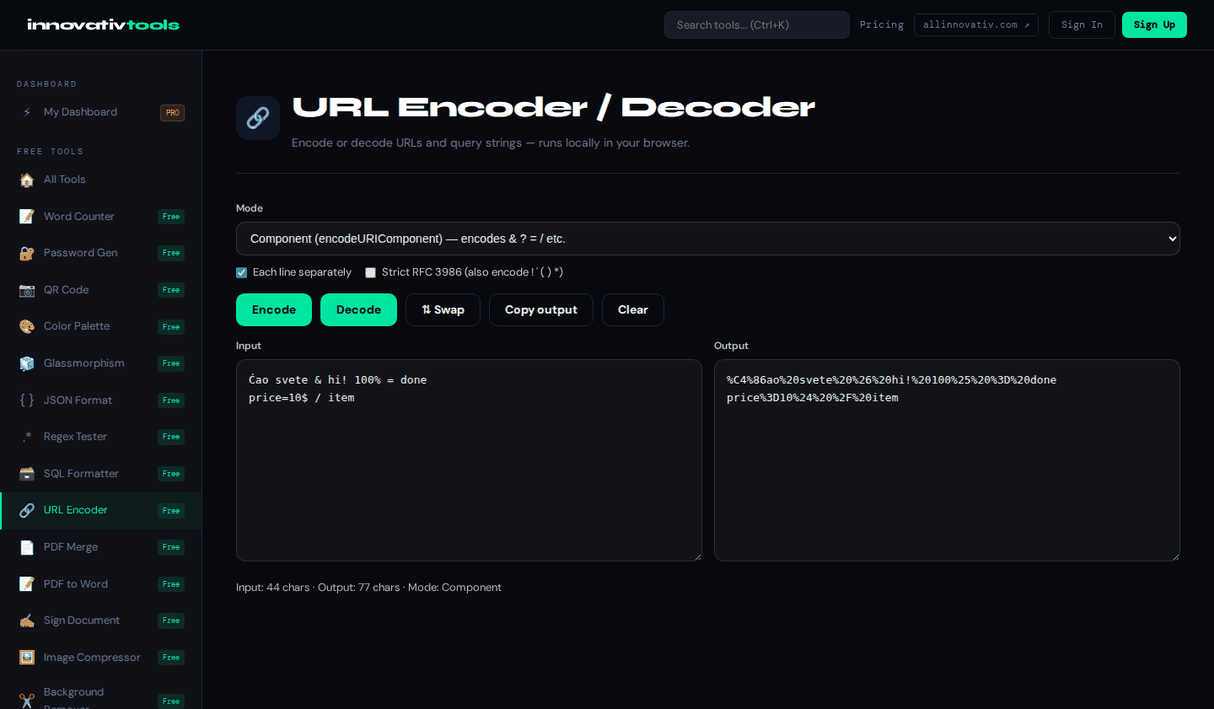
Paste a value and Component mode encodes it so it is safe after a ? or &. If the receiving side expects form encoding, Form data mode writes spaces as +. To go the other way, paste a full URL and the tool lists every parameter with its decoded value. It runs in your browser with no signup.
Why encode query string values
Unbreakable values
& = ? and # are escaped so a value cannot split the query.
Form encoding
Spaces as + when a server expects form data.
Parameter table
Paste a URL to read every parameter decoded.
Free and private
No signup; nothing is uploaded.
Frequently asked questions
Why do query string values need encoding?
Characters such as &, = and # have a special meaning in a query string. Unencoded, a value like “Tom & Jerry” would end the parameter at the &.
Which mode is right for query values?
Component mode, because it escapes & = ? / and #. Use Form data mode if the server expects + for spaces, as HTML forms send them.
Should spaces be %20 or +?
Both are common. %20 works everywhere in a URL; + means a space only in form-encoded query strings. Pick the mode that matches what the receiving side expects.
Can I read an existing query string?
Yes. Paste the full URL and a table lists each parameter with its decoded value.
Is my input private?
Yes. Encoding runs in your browser and nothing is uploaded.
The All Innovativ URL Encoder escapes values for query strings so characters like &, = and spaces cannot break a parameter, offers form encoding with + for spaces, and decodes a URL into a parameter table. It is free and runs in the browser.
Component mode escapes the characters with a special meaning in query strings (& = ? / #) as well as spaces and non-ASCII letters, which is the correct encoding for a single parameter value. Form data mode follows application/x-www-form-urlencoded and writes spaces as +. For an existing URL, the decoded parameters are listed in a table, including repeated keys. Everything runs in the browser and nothing is uploaded.