Base64 Encoder
Encode text or a file to Base64 instantly, standard or URL-safe, as UTF-8. Free, in your browser. Real examples below explain padding and size.
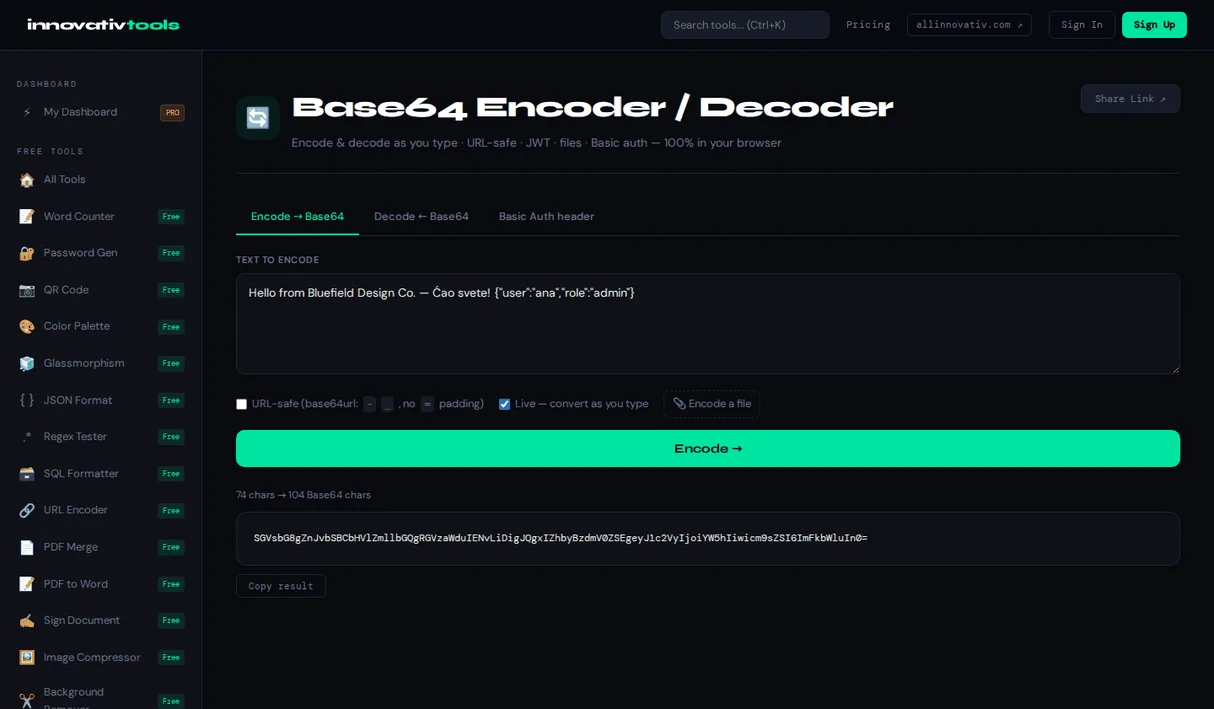
Encode to Base64Base64 turns any data into plain letters, digits and a few symbols, so it can travel through systems that only handle text: JSON, email, URLs, HTTP headers.
Below are real encodings that show how padding and UTF-8 work, when to use URL-safe output, file and auth-header encoding, and why Base64 is not encryption.
Real test: how Base64 encoding works
Text encoded in the Base64 tool, with the length line it shows under each result.
| Input | Base64 | Tool says |
|---|---|---|
| a | YQ== | 1 chars → 4 Base64 chars |
| ab | YWI= | 2 chars → 4 Base64 chars |
| abc | YWJj | 3 chars → 4 Base64 chars |
| Hello, World! | SGVsbG8sIFdvcmxkIQ== | 13 chars → 20 Base64 chars |
| Čačak ✓ 🍞 | xIxhxI1hayDinJMg8J+Nng== | 10 chars → 24 Base64 chars |
| user:pass?x=1&y=2 >>> | dXNlcjpwYXNzP3g9MSZ5PTIgPj4+ | 21 chars → 28 Base64 chars |
| The same, URL-safe | dXNlcjpwYXNzP3g9MSZ5PTIgPj4- | + became - |
The first three rows show the whole mechanism. Base64 turns every 3 bytes into 4 characters; when the input does not fill the last group of 3, = signs pad the end. That is why encoded data is always about a third larger than the original.
The fifth row shows why character counts mislead: "Čačak ✓ 🍞" is 10 characters but 17 bytes in UTF-8 (č is 2 bytes, ✓ 3, the emoji 4), so it became 24 Base64 characters. The tool encodes text as UTF-8, which is what APIs and browsers expect.
Standard or URL-safe?
| Standard Base64 | URL-safe (base64url) | |
|---|---|---|
| Characters 62 and 63 | + and / | - and _ |
| Padding | = at the end | No padding |
| Use for | Email attachments, data URIs, Basic auth, most APIs | URLs, file names, JWT tokens |
Tick URL-safe when the result goes into a link or a file name: + and / have special meanings there, and = would need escaping.
Encode files and auth headers
We encoded a 6,433-byte PNG logo with "Encode a file".
iVBORw0KGgoAAAANSUhEUgAAAZAAAAGQCAYAAACAvzbMAAAY6ElEQVR4Xu3de5ScZX3A8d87Mzu7m2R3c9mEW0BuKcglKlDBKt5q0Sp4PYr2VK0e1FMvSPVYPQe0WiyKFS9Y1CKtHhRs…
Every PNG starts with iVBORw0KGgo, the encoded form of the PNG signature. For CSS or HTML, put data:image/png;base64, in front of the result; the tool reminds you of that. Encoded images are about 33% larger, so this only pays off for small icons. The Basic Auth header tab builds the header from a user name and password: for user ana and password demo-only it produced Authorization: Basic YW5hOmRlbW8tb25seQ==, ready for testing an API.
Base64 is not encryption
Base64 hides nothing. A password in Base64 is a password in plain sight.
The header is only encoded, so it must travel over an encrypted connection.
Base64 exists to move binary data through text-only channels, not to protect it.
Every 3 bytes become 4 characters, so large files grow by a third.
How to encode to Base64
- Open the Base64 tool on the Encode tab.
- Type or paste text; with Live on, the result appears as you type. Or click Encode a file.
- Tick URL-safe if the result goes into a URL, file name or token.
- Copy the result.
Encoding runs in your browser; nothing you paste is sent anywhere. To go the other way, see the Base64 decoder.
Frequently asked questions
Why does Base64 end with = or ==?
Padding. Base64 encodes 3 bytes as 4 characters; = fills the gap when the last group is short. "a" became YQ== and "abc" YWJj in our test.
How much bigger is Base64?
About a third: every 3 bytes become 4 characters. 13 characters of text became 20 Base64 characters.
What is URL-safe Base64?
A variant with - and _ instead of + and / and no padding, used in URLs and JWTs.
Does it handle special characters and emoji?
Yes. Text is encoded as UTF-8; "Čačak ✓ 🍞" became xIxhxI1hayDinJMg8J+Nng==.
Can I encode an image to Base64?
Yes, with Encode a file. Add data:image/png;base64, in front to use it in CSS or HTML.
Is Base64 secure?
No. It is an encoding, not encryption; anyone can decode it.
Last updated: 18 November 2026.
The All Innovativ Base64 tool encodes text (as UTF-8) and files to standard or URL-safe Base64 (base64url, no padding), live as you type, with a Basic auth header builder, in the browser.
Real test: a → YQ==, ab → YWI=, abc → YWJj, "Hello, World!" (13 chars) → 20 Base64 chars, "Čačak ✓ 🍞" (10 chars, 17 bytes) → xIxhxI1hayDinJMg8J+Nng==, URL-safe replaced + with -; a 6,433-byte PNG encoded starting iVBORw0KGgo. Base64 is not encryption.