Beautify Messy SQL Queries
Turn a one-line query into clean, indented SQL with UPPERCASE or lowercase keywords. Strings, comments and parameters are left exactly as written.
Beautify SQLA query crammed onto one line is valid but painful to read, review and debug. Beautifying spreads the clauses out and indents the logic so a person can follow it.
Below is a real before and after, what the formatter never touches, the options, and why it is worth doing.
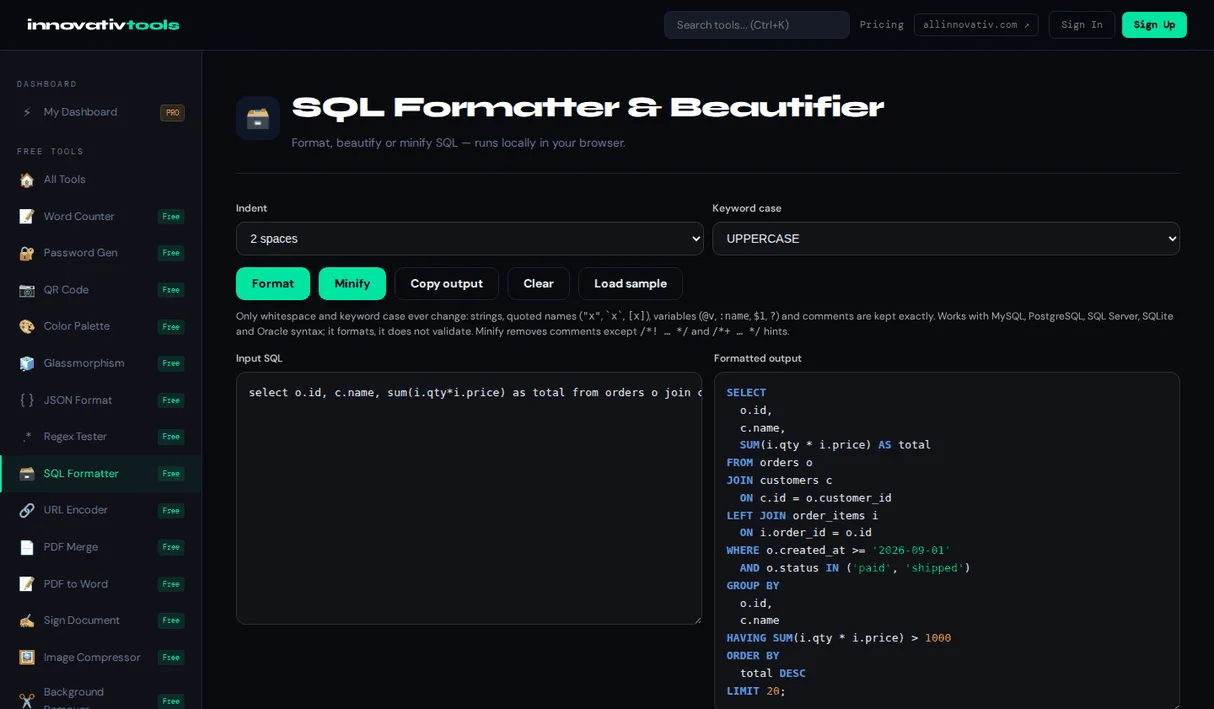
Real test: from one line to readable SQL
We pasted a one-line query into the SQL Formatter and clicked Format with the defaults (2 spaces, UPPERCASE keywords).
Input
select o.id,o.created_at,c.name as customer,sum(i.qty*i.price) total from orders o join customers c on c.id=o.customer_id left join order_items i on i.order_id=o.id where o.status in ('paid','shipped') and o.created_at>='2026-01-01' and c.note<>'select * from x' -- keep this comment
group by o.id,o.created_at,c.name having sum(i.qty*i.price)>100 order by total desc limit 20
Output
SELECT
  o.id,
  o.created_at,
  c.name AS customer,
  SUM(i.qty * i.price) total
FROM orders o
JOIN customers c
  ON c.id = o.customer_id
LEFT JOIN order_items i
  ON i.order_id = o.id
WHERE o.status IN ('paid', 'shipped')
  AND o.created_at >= '2026-01-01'
  AND c.note <> 'select * from x' -- keep this comment
GROUP BY
  o.id,
  o.created_at,
  c.name
HAVING SUM(i.qty * i.price) > 100
ORDER BY
  total DESC
LIMIT 20
Each clause starts on its own line, the selected columns and GROUP BY items are listed one per line, and JOIN conditions are indented under their join. Two details matter most: the text inside the string 'select * from x' was left alone even though it looks like SQL, and the -- keep this comment comment stayed where it was.
What is never changed
Backtick and double-quoted names and four styles of query parameters, formatted with UPPERCASE keywords.
SELECT
  `name`,
  "Total"
FROM dbo.Orders
WHERE id = @id
  AND ref = :ref
  AND x = $1
  AND y = ?;
Quoted names, variables and placeholders came through exactly as written: `name` and "Total", and @id, :ref, $1 and ?, which are the parameter styles of SQL Server, PDO, PostgreSQL and many drivers. Only whitespace and the case of keywords change, so a beautified query does the same thing as the original.
Options
| Option | Choices | Our test |
|---|---|---|
| Indent | 2 spaces, 4 spaces, Tab | 2 spaces, shown above |
| Keyword case | UPPERCASE, lowercase, Keep as-is | lowercase gave "select … from orders o join customers c" |
| Minify | One line, comments removed | The whole query on one line; the -- comment was dropped |
The formatter works with MySQL, PostgreSQL, SQL Server, SQLite and Oracle syntax. It formats, it does not validate: a query with a typo is formatted, not fixed. Run it in your database to check it.
Why beautify SQL
One clause per line makes a diff show exactly what changed.
A missing join condition or a wrong WHERE is easy to spot once each condition has its own line.
Generated SQL arrives on one line; formatting makes it readable.
Formatted queries in docs and tickets are easier to read and copy.
How to beautify SQL
- Open the SQL Formatter and paste your query, or click Load sample.
- Choose indent and keyword case.
- Click Format, then Copy output.
Everything runs in your browser, so queries with table names or data never leave your machine. See also keyword casing and minify SQL.
Frequently asked questions
What does an SQL beautifier do?
It puts each clause on its own line, indents joins and conditions, and sets the case of keywords, without changing what the query does.
Will it change strings or comments?
No. In our test a string containing "select * from x" and a -- comment stayed exactly as they were.
Are query parameters kept?
Yes. @id, :ref, $1 and ? came through unchanged.
Which SQL dialects work?
MySQL, PostgreSQL, SQL Server, SQLite and Oracle syntax.
Does it check my SQL for errors?
No. It formats only; run the query in your database to validate it.
Is my SQL uploaded?
No. Formatting runs in your browser.
Last updated: 18 November 2026.
The All Innovativ SQL Formatter beautifies or minifies SQL in the browser with 2-space, 4-space or tab indentation and UPPERCASE, lowercase or unchanged keywords, for MySQL, PostgreSQL, SQL Server, SQLite and Oracle syntax.
Real test: a one-line query with joins, GROUP BY, HAVING and LIMIT was split into one clause per line with indented ON conditions; the string 'select * from x', a -- comment, backtick and double-quoted names and the parameters @id, :ref, $1 and ? were unchanged. Minify removes comments.