Format & Beautify SQL Instantly.
Paste a messy query and get clean, indented, readable SQL in one click — or minify it to a single line. Keyword casing, syntax highlighting, and nothing leaves your browser.
What the SQL Formatter Does
3 Steps to Get Started
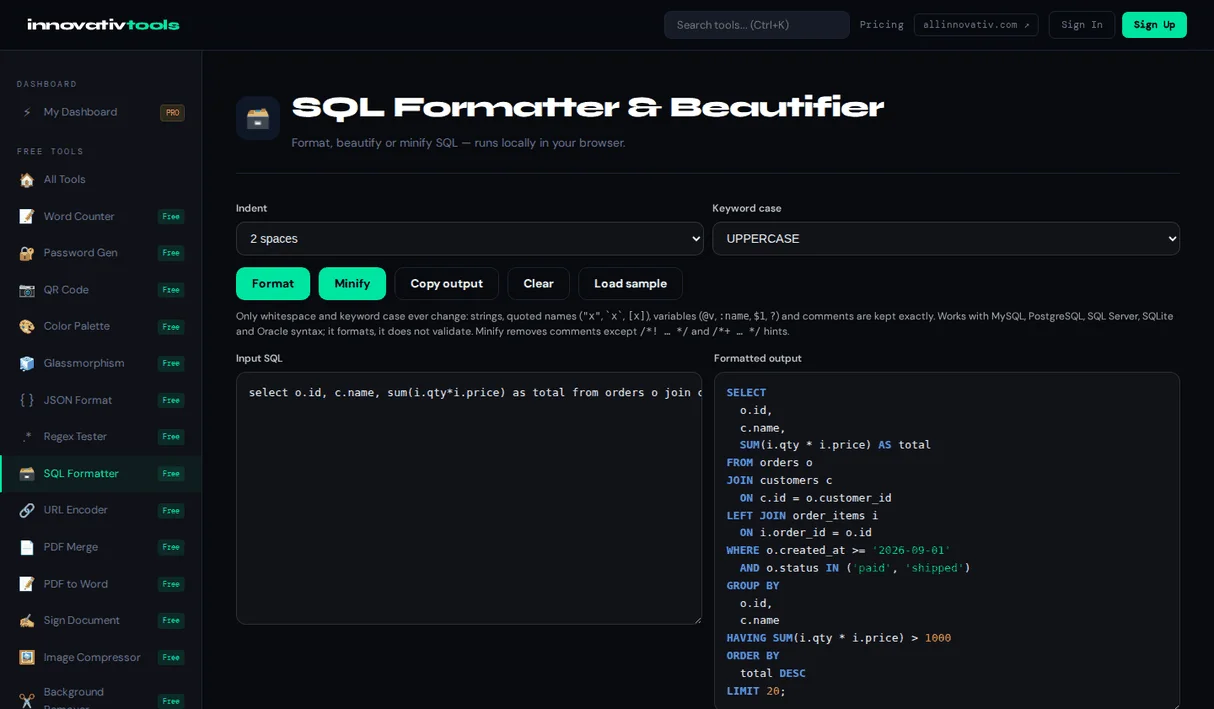
A real query, before and after
We pasted a one-line order report on 15 November 2026 with the default settings: 2-space indent, keywords in UPPERCASE.
Input
select o.id,c.name,sum(i.price*i.qty) as total from orders o join customers c on c.id=o.customer_id join items i on i.order_id=o.id where o.status='paid' and o.created_at>='2026-11-01' -- paid only
group by o.id,c.name having sum(i.price*i.qty)>40 order by total desc limit 10;
Format output (unedited)
SELECT
  o.id,
  c.name,
  SUM(i.price * i.qty) AS total
FROM orders o
JOIN customers c
  ON c.id = o.customer_id
JOIN items i
  ON i.order_id = o.id
WHERE o.status = 'paid'
  AND o.created_at >= '2026-11-01' -- paid only
GROUP BY
  o.id,
  c.name
HAVING SUM(i.price * i.qty) > 40
ORDER BY
  total DESC
LIMIT 10;
What it got right
- Each clause starts on its own line, and the JOIN conditions are indented under their JOIN.
- Functions, keywords and operators were spaced and capitalised, while strings such as 'paid' stayed as written.
- The comment stayed in place.
What to check
- Minify removed the comment
-- paid only. Keep the formatted version if comments matter. - It formats, it does not check.
SELEC name FORM cakeswas formatted without an error, so run the query to test it.
Four habits for readable SQL
- One clause per line. SELECT, FROM, JOIN, WHERE, GROUP BY and ORDER BY each start a line, so a reviewer sees the query’s shape at a glance.
- Indent conditions under their clause. ON and AND lines sit under the JOIN or WHERE they belong to.
- Pick one keyword case for the team. UPPERCASE is the most common; the tool can also force lowercase or keep yours.
- Minify only for transport. Use the minified line in logs or config strings, and keep the formatted query in your code and docs.
Related free tools
| If you need… | Use | Why |
|---|---|---|
| SQL formatted or minified | SQL Formatter Free | 2 or 4 spaces or tabs, keyword case, highlighting. |
| JSON results formatted | JSON Formatter Free | Formats and validates JSON. |
| A pattern for a LIKE or REGEXP filter | Regex Tester Free | Live matches and capture groups. |
| A query written, fixed or explained | Innovativ Code Free | Generate, debug or explain code with AI. |
Last updated: 15 November 2026.
Watch How It Works
A 0:48 walkthrough — from this page to the finished result. No sound needed.
Plays from YouTube when you press play. Watch on YouTube · More tutorials
Frequently Asked Questions
Yes. All formatting happens locally in your browser using JavaScript — your query is never uploaded or stored.
It formats standard SQL keywords used by MySQL, PostgreSQL, SQL Server, SQLite and most engines, including SELECT, JOIN, WHERE, GROUP BY and more.
Yes. The Minify button collapses your query to a single compact line, removing comments and extra whitespace.
Yes. Choose 2 spaces, 4 spaces or tabs for indentation, and set keywords to UPPERCASE, lowercase or keep them as-is.
Free to use. No account required. Works instantly in your browser.
Need to tidy up JSON instead? Use our JSON Formatter.
The All Innovativ SQL Formatter is a free, 100% browser-based tool that turns messy queries into clean, indented SQL or minifies them to a single line — with no upload, no account and no signup.
It formats entirely client-side, locally via the browser in JavaScript, so your query is never uploaded or stored — zero server-side retention. It pretty-prints standard SQL keywords used by MySQL, PostgreSQL, SQL Server and SQLite — SELECT, JOIN, WHERE, GROUP BY and more — with syntax highlighting, and you can choose 2 spaces, 4 spaces or tabs for indentation and set keyword casing. The Minify button collapses the query to one compact line and strips comments and extra whitespace. Unlike cloud-based formatters, nothing leaves your browser and there is no sign-up and no API key.
Ready to Clean Up Your SQL?
Open the free tool and format your first query — no signup, runs entirely in your browser.
Open SQL Formatter →