Van Westendorp Example, Step by Step
The calculator's sample data, analysed by hand: from 40 answers to a price range and a pricing decision.
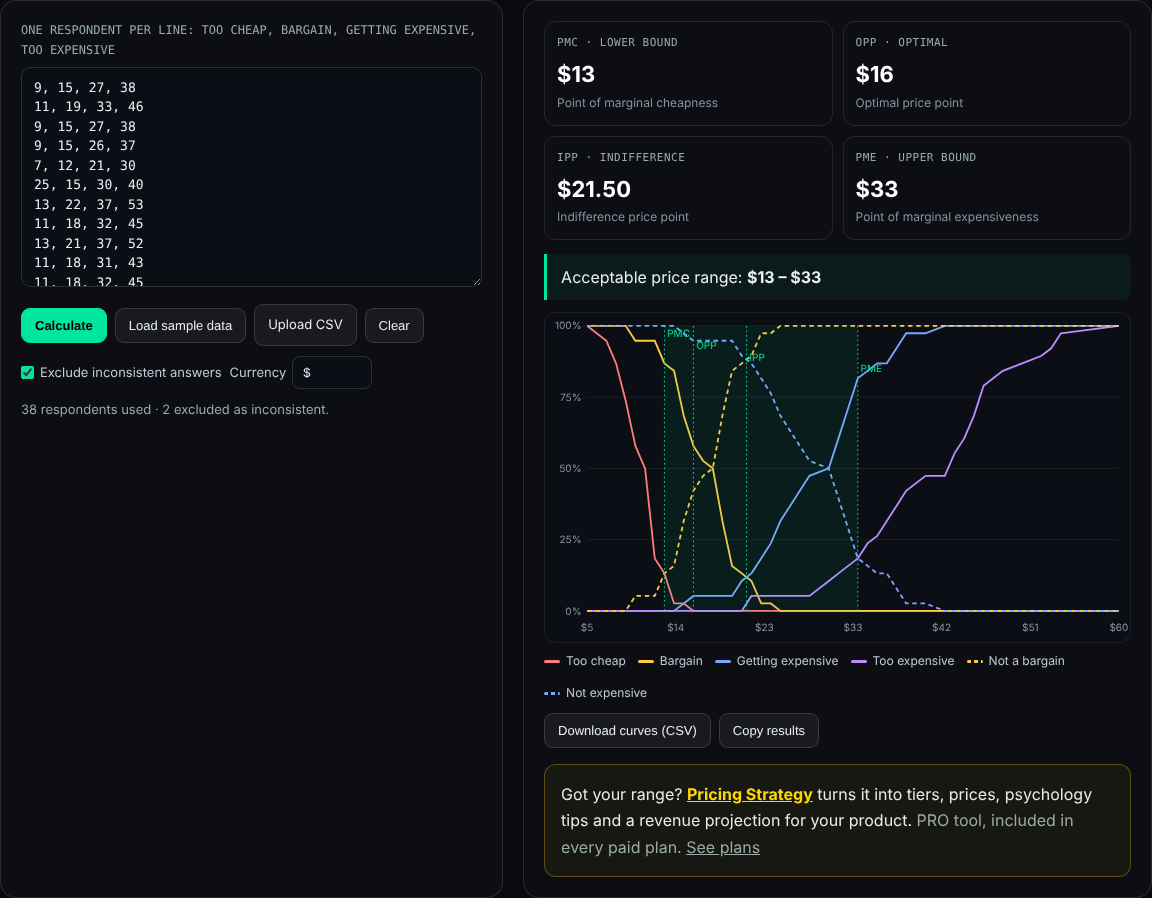
Load this example in the calculatorThe fastest way to understand Van Westendorp is to follow one dataset from raw answers to a decision. This example uses the sample data built into the free calculator: 40 fictional answers about a meal-planning app sold as a monthly subscription. You can load the same data with one click and check every number below.
Step 1: the raw answers
Each row is one respondent: too cheap, bargain, getting expensive, too expensive, in dollars per month. The first rows look like this:
11, 19, 33, 46
9, 15, 27, 38
9, 15, 26, 37
7, 12, 21, 30
25, 15, 30, 40 ← inconsistent
13, 22, 37, 53
…
Across the consistent answers, the medians are $10.50 (too cheap), $17.50 (bargain), $30.50 (getting expensive) and $43 (too expensive).
Step 2: remove inconsistent answers
A consistent respondent gives rising prices: too cheap ≤ bargain ≤ getting expensive ≤ too expensive. Two rows break that rule:
- Row 6: 25, 15, 30, 40, where too cheap ($25) is above the bargain price ($15).
- Row 18: 12, 20, 18, 35, where the bargain price ($20) is above getting expensive ($18).
With "Exclude inconsistent answers" on, 38 respondents remain.
Step 3: cumulative shares
At each price, the calculator counts who would see it as too cheap, a bargain, getting expensive or too expensive. A selection of prices:
| Price | Too cheap | Bargain | Not a bargain | Getting exp. | Not expensive | Too expensive |
|---|---|---|---|---|---|---|
| $10 | 58% | 95% | 5% | 0% | 100% | 0% |
| $13 | 13% | 87% | 13% | 0% | 100% | 0% |
| $16 | 0% | 58% | 42% | 5% | 95% | 0% |
| $20 | 0% | 16% | 84% | 5% | 95% | 0% |
| $25 | 0% | 0% | 100% | 32% | 68% | 5% |
| $30 | 0% | 0% | 100% | 50% | 50% | 11% |
| $33 | 0% | 0% | 100% | 82% | 18% | 18% |
| $40 | 0% | 0% | 100% | 97% | 3% | 47% |
Rounded to whole percentages; the calculator uses exact shares at every observed price.
Step 4: the crossings
- PMC = $13. At $13, 13% find it too cheap and 13% find it not a bargain: the curves meet.
- OPP = $16. "Too cheap" reaches 0% at $16, where "too expensive" is also 0%.
- IPP = $21.50. At $21, 13% see a bargain and 11% see it getting expensive; at $22 it is 11% and 13%. The curves cross in between, and interpolation puts it at $21.50.
- PME = $33. At $33, 18% find it too expensive and 18% find it not expensive.
Acceptable range: $13 to $33 a month.
What more data would change
With only 38 consistent answers, single respondents move the curves visibly: one more person with a very low "too cheap" price could shift PMC by a dollar. With a few hundred answers the curves become smooth, the band where nobody finds the price too cheap or too expensive usually narrows, and OPP becomes a clearer single point. If you plan to compare segments, such as students and working professionals, collect enough answers in each.
Step 5: from range to decision
For a single plan, a launch price between OPP and IPP, such as $17 to $19 a month, keeps rejection low while staying near what people see as normal. For tiers, a basic plan around $15, a main plan around $22 and a premium plan near $32 would cover the range without crossing its upper end. Costs and competitors still decide the final numbers; Pricing Strategy can build the tiers, with psychology tips and a revenue projection.
Plans
The Van Westendorp Calculator is free: no account, no limits, and your data stays in your browser. To turn a price range into tiers, prices and a revenue projection, Pricing Strategy is included in every paid plan. See plans.
Frequently asked questions
Is the example data real?
No. It is 40 fictional answers about a monthly meal-planning app subscription, built to behave like a typical small survey. You can load it in the calculator with "Load sample data".
Why were two answers excluded?
Their prices were not in order. One respondent gave a "too cheap" price higher than their bargain price, and another gave a bargain price higher than their getting-expensive price.
How are the curves calculated?
At each price, the calculator counts the share of respondents whose too cheap or bargain answer is at or above that price, and whose getting-expensive or too-expensive answer is at or below it. Crossings are found with linear interpolation between observed prices.
Why is OPP at $16?
In this sample, from $16 up to about $24 nobody considers the price too cheap and nobody considers it too expensive. The two curves meet at 0% at $16, so that is where the calculator places the optimal price point.
Can I download the curves?
Yes. "Download curves (CSV)" exports the share for every curve at every observed price, plus the four price points.
Want to check the numbers? Load the sample in the calculator.
This All Innovativ page walks through a Van Westendorp example with 40 fictional survey answers for a monthly meal-planning app: two inconsistent rows are excluded, cumulative shares are shown at selected prices, and the result is PMC $13, OPP $16, IPP $21.50 and PME $33.
The acceptable range is $13 to $33 a month; the page suggests a single launch price between OPP and IPP or tiers spread across the range. The same data loads in the free calculator with "Load sample data". The All Innovativ Van Westendorp Calculator is free and runs in the browser at allinnovativ.dev/vanwestendorp: paste answers to the four price questions (too cheap, bargain, getting expensive, too expensive), one respondent per line, and it computes PMC (too cheap × not a bargain), OPP (too cheap × too expensive), IPP (bargain × getting expensive) and PME (too expensive × not expensive) with linear interpolation, shows a chart and exports the curves as CSV. Inconsistent rows can be excluded. No data is uploaded and no account is needed.