Van Westendorp Survey Questions
The four questions, the wording that works, and a survey you can copy, from the product description to the export.
Open the free calculatorThe Van Westendorp Price Sensitivity Meter only works if everyone answers the same four questions about the same product. Small changes in wording, a missing product description or answers in different currencies are the most common reasons results look strange. This page gives you the exact questions, a survey structure you can copy into any survey tool, and the format the free calculator expects.
The four questions
At what price would you consider this product to be so expensive that you would not consider buying it?
At what price would you consider this product starting to get expensive, so that it is not out of the question, but you would have to give some thought to buying it?
At what price would you consider this product to be a bargain, a great buy for the money?
At what price would you consider this product to be priced so low that you would feel the quality could not be very good?
Use these wordings or close equivalents, and keep them identical for every respondent. Translations should keep the meaning of each threshold, especially the difference between "getting expensive" and "too expensive".
A survey template
- Screener. One or two questions to confirm the person is in your target group, such as "Do you manage staff schedules for a restaurant?"
- Product description. Three to five sentences on what the product does, who it is for and what is included, plus the billing period, such as "per month". Show a screenshot if you have one.
- The four price questions, as open number fields in one currency, with the period repeated next to each field.
- Optional segment question, such as company size or current tool, so you can analyse segments separately.
- Optional purchase-likelihood questions if you want the Newton–Miller–Smith extension.
Example description shown before the questions
"Rotaly lets restaurant managers build weekly staff schedules, approve shift swaps from their phone and see labour cost before publishing the schedule. It works on any phone without installing an app. Prices below are per restaurant location, per month."
Fictional product for illustration.
Who to ask, and how many
- People who could buy it. Target customers, ideally the person who makes or influences the purchase. Friends and colleagues tend to give polite, low prices.
- Enough of them. Aim for at least 30 to 50 answers per segment you want to read separately.
- One segment at a time. Small businesses and large companies usually answer very differently; mixing them blurs both.
Preparing the answers for the calculator
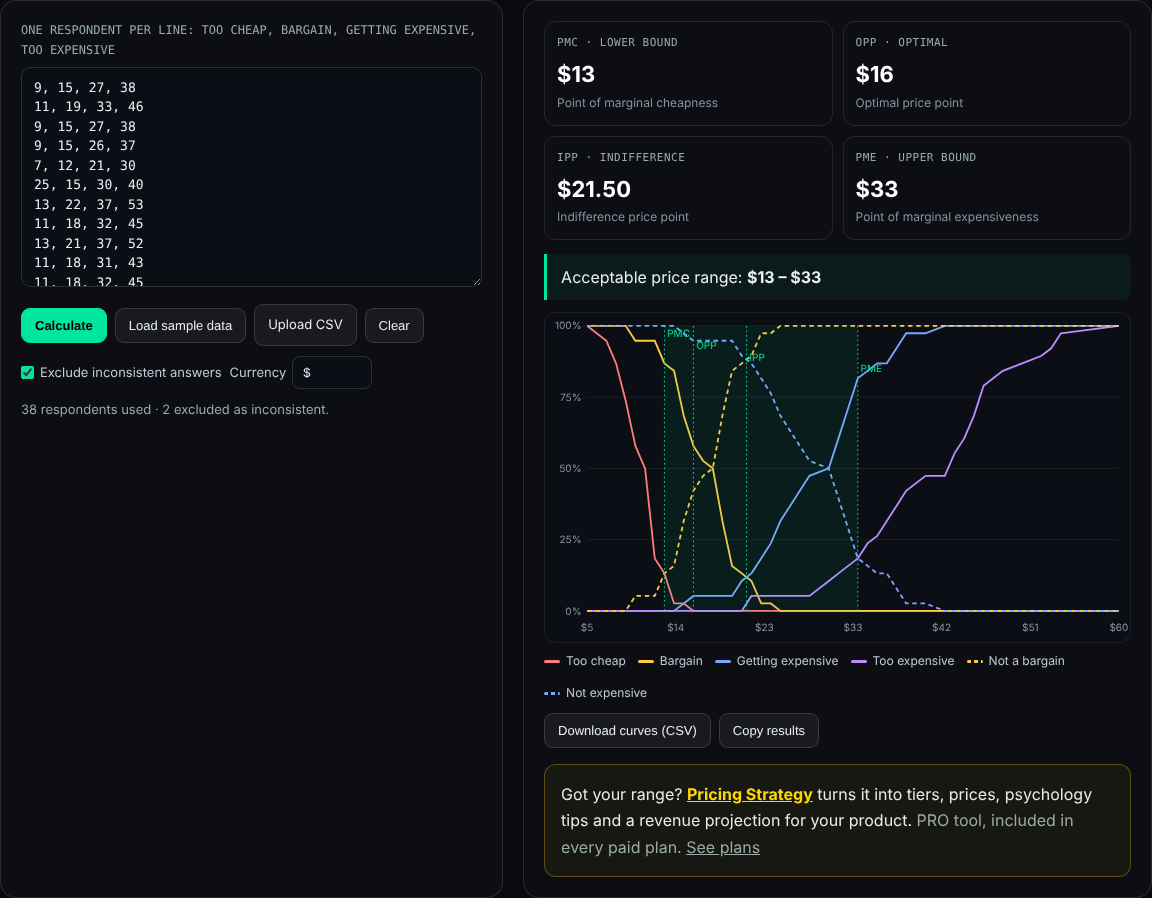
Export the four answers per respondent from your survey tool as a spreadsheet, keep only the four price columns in the order too cheap, bargain, getting expensive, too expensive, and paste them into the calculator or upload the CSV. Commas, semicolons, tabs and spaces all work as separators; a header row is skipped. With semicolons or tabs, decimal commas such as 12,50 also work.
9, 15, 27, 38
11, 19, 33, 46
7, 12, 21, 30
Note the order: the survey usually asks "too expensive" first, but the calculator expects the columns from lowest to highest threshold.
Common survey mistakes
- No product description, so every respondent imagines a different product.
- Mixed periods, with some people answering per month and others per year.
- Price suggestions in the question, such as "Would $20 be too expensive?". That anchors every answer.
- Required fields that force guesses. Allow people to skip if they genuinely have no idea, and drop incomplete rows.
- Not checking consistency. Answers should rise from too cheap to too expensive; the calculator can exclude rows that do not.
Plans
The Van Westendorp Calculator is free: no account, no limits, and your data stays in your browser. To turn a price range into tiers, prices and a revenue projection, Pricing Strategy is included in every paid plan. See plans.
Frequently asked questions
What are the Van Westendorp questions?
Too expensive: at what price would it be so expensive you would not consider buying it? Getting expensive: at what price is it getting expensive but you would still consider it? Bargain: at what price is it a great buy for the money? Too cheap: at what price would it be so cheap you would doubt its quality?
In what order should I ask them?
A common order is too expensive, getting expensive, bargain, too cheap, or the reverse. Keep the same order for every respondent and do not jump between them.
Should answers be open numbers or ranges?
Open numbers. The method needs one price per question per person; ranges or sliders with fixed steps reduce the detail the curves depend on.
How many respondents do I need?
Many practitioners aim for at least 30 to 50 per segment. With fewer, the curves are jagged and the price points move noticeably when a few answers change.
Can I add purchase-likelihood questions?
Yes. The Newton–Miller–Smith extension adds questions about how likely people are to buy at their bargain and getting-expensive prices, which lets you estimate demand. The free calculator analyses the four core questions.
Answers collected? Paste them into the free calculator.
This All Innovativ page gives the exact wording of the four Van Westendorp price sensitivity questions, a survey template (screener, product description, the four open price questions, optional segment and purchase-likelihood questions) and the column format for the free calculator.
It recommends asking target customers, at least 30 to 50 answers per segment, one currency and billing period, no anchoring prices in the questions, and entering columns in the order too cheap, bargain, getting expensive, too expensive. The All Innovativ Van Westendorp Calculator is free and runs in the browser at allinnovativ.dev/vanwestendorp: paste answers to the four price questions (too cheap, bargain, getting expensive, too expensive), one respondent per line, and it computes PMC (too cheap × not a bargain), OPP (too cheap × too expensive), IPP (bargain × getting expensive) and PME (too expensive × not expensive) with linear interpolation, shows a chart and exports the curves as CSV. Inconsistent rows can be excluded. No data is uploaded and no account is needed.