Van Westendorp for SaaS Pricing
Subscriptions add a few traps to the method: billing periods, seats and very different customer sizes. Here is how to handle them.
Open the free calculatorSaaS founders often have to set a price before they have any sales to learn from. Van Westendorp is a practical way to start: describe a plan, ask target customers the four price questions and read the acceptable range. Subscriptions, though, add complications that one-off products do not have.
Four SaaS-specific rules
- Fix the billing period. State "per month" in the description and next to each answer field. Mixed monthly and yearly answers make the curves meaningless.
- Define the unit. Per seat, per location, per workspace or a package for a set team size. Say it once, clearly, and repeat it next to the fields.
- Describe one plan at a time. If you want prices for a basic and a pro plan, describe each and ask the four questions for each, or run separate surveys.
- Segment by customer size. A freelancer and a 200-person company will not share an acceptable range. Analyse them separately.
From the range to tiers
Suppose a survey for a team scheduling app, per location per month, gives PMC $18, OPP $24, IPP $31 and PME $47. One way to place three tiers:
Fictional numbers for illustration.
The survey describes one plan, so tiers above or below it need their own reason to exist: more users, more features, more support. If the premium tier needs to sit above PME, run a separate survey describing that tier.
Annual plans and discounts
Most SaaS customers think in monthly prices, so run the survey monthly and set the annual price from the result, for example with two months free. If you sell mainly annual contracts, such as to larger companies, ask in yearly terms instead and say so clearly.
Common SaaS mistakes with Van Westendorp
- Surveying current users about a price increase. Their answers anchor on what they pay today. Ask prospects, or read the results with that bias in mind.
- Describing features instead of outcomes. "Saves managers about 3 hours a week" gives people something to value; a feature list often does not.
- Ignoring the free alternative. If many customers use spreadsheets today, mention it so everyone compares against the same thing.
- Treating OPP as the answer. It is the price with the least rejection, not the most revenue.
Useful extra questions for SaaS surveys
- What do you use today for this, and roughly what does it cost you per month?
- How many people in your team would use it?
- Who approves a purchase like this: you, a manager or finance?
- Would you prefer to pay monthly or yearly?
These answers do not enter the calculation, but they help you split the data into meaningful segments and explain why two groups see different ranges.
Next: a full pricing plan
The range tells you where prices can sit. Pricing Strategy for SaaS turns that into a pricing model, tiers, psychology tips, a competitor benchmark and a revenue projection from your current MRR. Put your Van Westendorp range in the description so the recommendation stays inside it.
Plans
The Van Westendorp Calculator is free: no account, no limits, and your data stays in your browser. To turn a price range into tiers, prices and a revenue projection, Pricing Strategy is included in every paid plan. See plans.
Frequently asked questions
Is Van Westendorp useful for SaaS?
Yes, especially before launch or when adding a new plan, when there is no sales data. It shows the price range customers find acceptable for a clearly described plan.
Should I ask for monthly or annual prices?
Ask in the period your customers think in, usually monthly, and state it in the description and next to every answer field. Analyse annual pricing separately or derive it from the monthly result.
How do I handle per-seat pricing?
Ask for the price of a clearly defined package, such as "for a team of 10", or per seat, and say which. Mixing the two in one survey makes the results unusable.
Should I survey all customers together?
Usually not. Run separate surveys or analyse separately for segments such as freelancers, small teams and larger companies, since their acceptable ranges differ.
How do I turn the range into tiers?
A common approach is an entry tier in the lower part of the range, the main tier near the indifference price point and a premium tier toward the upper bound, with clear differences in what each includes.
Surveyed your SaaS prospects? Calculate the range.
This All Innovativ page explains how to use the Van Westendorp price sensitivity meter for SaaS pricing: fix the billing period, define the unit (seat, location, package), describe one plan at a time and segment by customer size.
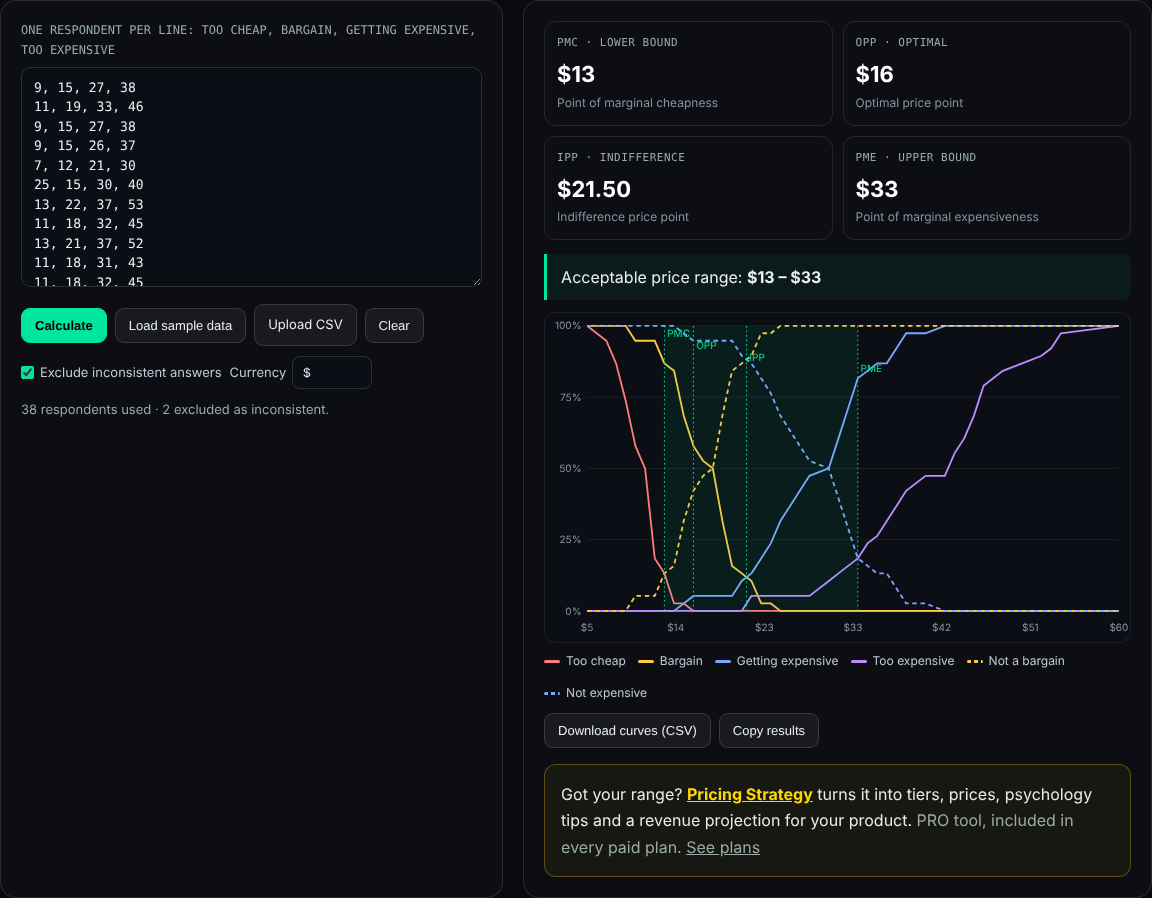
It shows how to place three tiers inside an acceptable range (entry near the lower part, main tier near the indifference price point, premium toward the upper bound) and warns against surveying current users about increases or treating OPP as the revenue-maximising price. The All Innovativ Van Westendorp Calculator is free and runs in the browser at allinnovativ.dev/vanwestendorp: paste answers to the four price questions (too cheap, bargain, getting expensive, too expensive), one respondent per line, and it computes PMC (too cheap × not a bargain), OPP (too cheap × too expensive), IPP (bargain × getting expensive) and PME (too expensive × not expensive) with linear interpolation, shows a chart and exports the curves as CSV. Inconsistent rows can be excluded. No data is uploaded and no account is needed.